


 |
| presentation |
 |
| documentation |
 |
| creation |
 |
| automation |
 |
| bim after dark live |
Wednesday, December 19, 2012
Revit Tip - Architectural Visualization Workflow with 3D Max and Revit 2013
I found this link on my Facebook news feed for the Autodesk Education Community and thought it was so good I had to share. The material was created by Marvi Basha, and Autodesk Student Expert. If you have not explored the connection between Autodesk Revit and 3D Max 2013 this is where to start....


Tuesday, December 18, 2012
Project Falcon - Revit Wind Tunnel Simulations
Labels:
project falcon,
revit wind,
wind revit
Well, this looks pretty fun. Now you can use the wind tunnel simulation introduced in Vasari within Revit. Not really sure what I would use this for at the moment but it sure looks cool.
Click here to check out the post on the Autdoesk Labs site...
Click here to check out the post on the Autdoesk Labs site...
Monday, December 17, 2012
Revit and CryEngine 3 - First Person BIM
Labels:
crydev,
cryengine,
cryengine 3,
revit,
revit and cryengine
I mentioned a couple times on the blog how I was inspired by Marcello's presentation at the Revit Technology Conference this past year. During one of his classes Marcello demonstrated how his Revit model's were imported into CryEngine 3. Well, I told Marcello afterward that I would be jumping into this concept right away. Needless to say, I did. I had an opportunity to take an independent study this semester and dedicated it to truly "interactive rendering" using CryEngine. Click here for more images and information....
**Edit** If you want to learn HOW to get your Revit model into CryEngine there is an eBook included in BIM After Dark - Volume 1 that shows the process step-by-step...


Friday, December 14, 2012
Boost Your BIM - New Revit API Blog!
Labels:
BIM,
boost your bim,
Revit API,
revit coding
There is a cool new Revit API blog with a nice simple layout. Here is a description from the author, Harry.
Hi – I hope you find this blog both informative and thought-provoking! With 14 years experience as an employee of Revit Technology Corp & Autodesk, including 4 years as a developer on the Revit API team, I hope to make your work with Revit more productive and enjoyable. If you are interested in custom development or training (online or in-person), please contact me at BoostYourBIM@gmail.com - Regards, Harry
Do you use Revit? Interesting in making it better? Instead of waiting for the next release from Autodesk, this blog will be a place to explore how we can improve Revit now with its API to customize, integrate, and enhance it. Please post comments and questions about what would interest you.
Definitely a blog you want to start following!
Click here to check it out now!
Hi – I hope you find this blog both informative and thought-provoking! With 14 years experience as an employee of Revit Technology Corp & Autodesk, including 4 years as a developer on the Revit API team, I hope to make your work with Revit more productive and enjoyable. If you are interested in custom development or training (online or in-person), please contact me at BoostYourBIM@gmail.com - Regards, Harry
Do you use Revit? Interesting in making it better? Instead of waiting for the next release from Autodesk, this blog will be a place to explore how we can improve Revit now with its API to customize, integrate, and enhance it. Please post comments and questions about what would interest you.
Definitely a blog you want to start following!
Click here to check it out now!
Tuesday, December 11, 2012
Warnings...
Dear Autodesk,
Please invent a new way of correcting errors and warnings.... I am running out of sticky notes to write element ID's on...
Thanks,
- Jeff
Please invent a new way of correcting errors and warnings.... I am running out of sticky notes to write element ID's on...
Thanks,
- Jeff
Sunday, December 9, 2012
Revit Tip - 2013 Stair Shape Handles (RevitCat)
Labels:
2013 stairs,
component stair,
revit 2013,
revit cat,
revit stair,
revit tip,
revit tutorial,
revitcat,
stair by component,
stair component,
stairs
What a great post by Tim Waldock. If you are using Revit 2013 and the component based stairs then you MUST read it. Tim delivers a fully detailed insight on each of the shape handles present when using the stairs. The component stair can be very intimidating but SO powerful when understood...
Thanks for the write-up Tim!
Wednesday, December 5, 2012
Revit Technology Conference 2013 - North America : Abstract Deadline
Labels:
abstracts,
revit technology conference,
rtc 2013,
rtc na
For anyone wanting to teach a class or give a lecture at RTC North America next you the deadline is approaching. You have until December 17th to submit your abstracts... I have been super busy with school but when I went onto the RTC North America website and noticed I have become one of the poster-boys for the conference ;) (see below) I decided I have no choice but to submit.


Monday, November 26, 2012
Autodesk FormIt - Vasari on the iPad?
Labels:
Apple iPad,
autodesk formit,
autodesk ipad,
formit,
vasari
All I can say is... awesome....
It is in the App Store now ... for Free!
It is in the App Store now ... for Free!
Tuesday, November 20, 2012
An Architect's Guide to Integrated Energy Modeling
I found this floating around Twitter (@TheRevitKid) a little while ago... I have only skimmed it so far but it is definitely worth a look. The layout is very cool and I like some of the terms the AIA uses (oh, and it is pretty cool that they mention Vasari). Check out the PDF below:
www.aia.org/aiaucmp/groups/aia/documents/pdf/aiab096060.pdf?goback=.gmr_2585365.gde_2585365_member_184187681
www.aia.org/aiaucmp/groups/aia/documents/pdf/aiab096060.pdf?goback=.gmr_2585365.gde_2585365_member_184187681
How to Download Free Autodesk Software as a Student
Labels:
autodesk,
autodesk education community,
autodesk student,
education community,
student community
I do get questions about how to download and use the free software offered by Autodesk to Students... Well, here is a nice video explaining the process...
Source:
AutodeskCare, Everyone loves free stuff, right? Free food, free...
http://autodeskcare.com/post/33230157617/everyone-loves-free-stuff-right-free-food-free
Source:
AutodeskCare, Everyone loves free stuff, right? Free food, free...
http://autodeskcare.com/post/33230157617/everyone-loves-free-stuff-right-free-food-free
Monday, November 12, 2012
Autodesk 360 Cloud Rendering - Another Review
Well, it has been a little while since Autodesk released the ability to render in the cloud. I have to say, it has come a long way (I have had mixed reviews in the past). I have been using and testing this technology starting as a plug-in to Revit 2012. Now, it is fully built into Revit 2013 and the overall process is much more fluent I just wanted to run through a few things I feel have gotten better (or worse) while rendering in the cloud.
I am using Revit 2013 (One-box) updated to Service Pack 2....
One thing I remember from the very first cloud renderings I produced was a disconnect when it came to custom materials. Revit has some cool default materials but over the years they get really old. I love making and finding new textures and using them for renderings. Well, this has finally gotten to a reasonable point in cloud rendering. The custom materials, bump maps, and reflections are all very close to Revit's renderings. The one exception you must be aware of is glazing. For some reason the reflection/refraction of glazing on the cloud appears much different than on native Revit renderings. You might need to makes some tweaks to it.
Speed and Efficiency
The speed and efficiency of using cloud rendering is it's biggest selling point. Sending 40 renderings to the cloud and having them finish 20 minutes later without impeding on your workflow is AWESOME. It is so much better than letting an 8 hour rendering run overnight only to find you screwed up somewhere. I cannot begin to tell you how insane it would get rendering 20+ hour images a week before the presentation... I know many fellow college kids are going through that right now.
FREE!! For Students...
The cloud rendering and other Autodesk 360 Services are now free for students to use... I repeat... Not a trial! This is awesome considering the intensity of studio projects and schedules as well as the lack of rendering farms or super computers in a student's budget.
Night/Ambient Renderings
I have yet to get Revit and the Cloud renderings of exterior night scenes to look remotely similar. I have tried messing with sun lighting (the 2.A.M. trick) and seeing how that effects the cloud with no luck... Granted, the renderings on the cloud look pretty sweet but it is very difficult to make them NOT look like a nuclear bomb went off... A perfect example can be seen in the images below:


Artificial Lighting
I haven't been able to confirm this yet but so far if any of my rendering have artificial lighting in them they will render as so in the cloud. That is to say there is no way to turn them off (even if my render setting are set to day lighting only). Most of the time I don't mind this but the option would be nice.
Resolution and Size
I can understand why the resolution of a cloud rendering might want to be limited... but... we need something a little larger! In this day and age where retina displays and 1200dpi printers are becoming more and more common a maximum of 2000 pixels wide is just not cutting it. I have managed to print some pretty good looking boards (24x36) with the cloud renderings but the pixelizing is very noticeable. Therefore, if you require a 150 to 300dpi image and need some serious detail (even when zoomed) then you may have to stay inside Revit.
Still No Pay-Per-Render
There is still any sign of a pay-per-render or subscription offer from Autodesk. I know... I know... If you are a subscription user you get it all to use ... But, is everyone on subscription yet? I guess Autodesk hopes so.

I am using Revit 2013 (One-box) updated to Service Pack 2....
The Good:
Custom Materials:One thing I remember from the very first cloud renderings I produced was a disconnect when it came to custom materials. Revit has some cool default materials but over the years they get really old. I love making and finding new textures and using them for renderings. Well, this has finally gotten to a reasonable point in cloud rendering. The custom materials, bump maps, and reflections are all very close to Revit's renderings. The one exception you must be aware of is glazing. For some reason the reflection/refraction of glazing on the cloud appears much different than on native Revit renderings. You might need to makes some tweaks to it.
Speed and Efficiency
The speed and efficiency of using cloud rendering is it's biggest selling point. Sending 40 renderings to the cloud and having them finish 20 minutes later without impeding on your workflow is AWESOME. It is so much better than letting an 8 hour rendering run overnight only to find you screwed up somewhere. I cannot begin to tell you how insane it would get rendering 20+ hour images a week before the presentation... I know many fellow college kids are going through that right now.
FREE!! For Students...
The cloud rendering and other Autodesk 360 Services are now free for students to use... I repeat... Not a trial! This is awesome considering the intensity of studio projects and schedules as well as the lack of rendering farms or super computers in a student's budget.
The Bad:
Night/Ambient Renderings
I have yet to get Revit and the Cloud renderings of exterior night scenes to look remotely similar. I have tried messing with sun lighting (the 2.A.M. trick) and seeing how that effects the cloud with no luck... Granted, the renderings on the cloud look pretty sweet but it is very difficult to make them NOT look like a nuclear bomb went off... A perfect example can be seen in the images below:

Native Revit
Autodesk 360 Cloud
Although I think the cloud rendering looks pretty cool it's just the differences between the two I wanted to point out... Same settings, different images.
Artificial Lighting
I haven't been able to confirm this yet but so far if any of my rendering have artificial lighting in them they will render as so in the cloud. That is to say there is no way to turn them off (even if my render setting are set to day lighting only). Most of the time I don't mind this but the option would be nice.
Resolution and Size
I can understand why the resolution of a cloud rendering might want to be limited... but... we need something a little larger! In this day and age where retina displays and 1200dpi printers are becoming more and more common a maximum of 2000 pixels wide is just not cutting it. I have managed to print some pretty good looking boards (24x36) with the cloud renderings but the pixelizing is very noticeable. Therefore, if you require a 150 to 300dpi image and need some serious detail (even when zoomed) then you may have to stay inside Revit.
Still No Pay-Per-Render
There is still any sign of a pay-per-render or subscription offer from Autodesk. I know... I know... If you are a subscription user you get it all to use ... But, is everyone on subscription yet? I guess Autodesk hopes so.
Saturday, November 10, 2012
Revit Not Supported on Widnows 8 Yet...
Interesting....
Issue
You want to know which Autodesk products are supported on Microsoft Windows® 8.
Note: Unless indicated otherwise, this information applies to the 2013-2010 versions of all Autodesk products. Autodesk product versions of 2009 and earlier are no longer supported and are not included in considerations of Windows 8 compatibility.
Solution
Autodesk intends to support many of our key products on Windows 8 and will add additional products to the list of products supported on Windows 8 as updates and future versions are released. Product Support will provide its best effort to assist customers who have issues with products that are not currently supported.
The Autodesk products listed below have been tested and are confirmed as working correctly on Microsoft Windows 8 operating system:
- Autodesk 3ds Max 2013
- Autodesk 3ds Max Design 2013
- Autodesk Maya 2013
- Autodesk MotionBuilder 2013
- Autodesk Mudbox 2013
- Autodesk Softimage 2013
- Autodesk SketchBook Designer 2013
Autodesk 360 Cloud Services FREE for Students!!!
Labels:
autodesk 360 cloud,
cloud rendering,
rendering 360,
revit cloud,
revit student rendering,
revit students
This is HUGE news... I have expressed my feelings about the amount of free renderings Autodesk has offered to students (especially without the option of buying more) in the past. Well, I would like to think that maybe I had something to do with the latest news... Autodesk is giving those with a student account free reign of many Autodesk 360 Cloud Services!
Autodesk 360 Cloud Services
Students now can access virtually infinite computing power with Autodesk cloud-based solutions. Learn how you can create, visualize, analyze, simulate, and iterate your designs faster–eliminating long wait time in studios or computer labs. Improve your course project outcomes by moving computation-intensive tasks to the cloud, enabling rapid visualization and simulation and optimized collaboration with access to intelligent, data-rich models. Learn how you can solve your complex design challenges anywhere, anytime right now.
Render Your Designs in the Cloud Today!
Save time and produce compelling, near-photorealistic visualizations without tying up your desktop. Render your designs faster–eliminating long wait time in studios or computer labs. Learn how you can improve your course project outcomes by moving computation-intensive tasks to the cloud today.
For more information about the Autodesk Cloud-Based offerings, visit www.autodesk.com/studentcloud
For those of you who have already used all your cloud renderings log back into Autodesk 360 and take a look at your account... Something should look a tad bit different...

Autodesk 360 Cloud Services
Students now can access virtually infinite computing power with Autodesk cloud-based solutions. Learn how you can create, visualize, analyze, simulate, and iterate your designs faster–eliminating long wait time in studios or computer labs. Improve your course project outcomes by moving computation-intensive tasks to the cloud, enabling rapid visualization and simulation and optimized collaboration with access to intelligent, data-rich models. Learn how you can solve your complex design challenges anywhere, anytime right now.
Render Your Designs in the Cloud Today!
Save time and produce compelling, near-photorealistic visualizations without tying up your desktop. Render your designs faster–eliminating long wait time in studios or computer labs. Learn how you can improve your course project outcomes by moving computation-intensive tasks to the cloud today.
For more information about the Autodesk Cloud-Based offerings, visit www.autodesk.com/studentcloud
For those of you who have already used all your cloud renderings log back into Autodesk 360 and take a look at your account... Something should look a tad bit different...

USB Flash Drive Recovery - A+ Perfect Computers
I normally try not to solicit all that much on this blog but this is a special occasion. Last week my flash drive died. It was unresponsive on every computer. Well, let's just say I had a good weeks worth of work on there that was not yet backed up in my many locations (hard drive, clouds, desktops, etc...). After searching around to find someone who could recover it I ran across a website of a company in my hometown. Calling around to other places and finally A+ Perfect Computers in Fairfield, CT they were the best priced with a quick turn around.
I dropped off my dead flash drive on Tuesday and my recovered files were ready for me to pick up on Friday morning. So far, it looks like EVERYTHING was restored... Apparently they had to literally remove the processor and extract the data... They answered all my questions and concerned throughout the process and I am truly grateful.
Well, if you eve find yourself in a pickle (as I did) they do take shipped in flash drives and I am assuming the turn around is just as good (minus the shipping)....
Links:
I dropped off my dead flash drive on Tuesday and my recovered files were ready for me to pick up on Friday morning. So far, it looks like EVERYTHING was restored... Apparently they had to literally remove the processor and extract the data... They answered all my questions and concerned throughout the process and I am truly grateful.
Well, if you eve find yourself in a pickle (as I did) they do take shipped in flash drives and I am assuming the turn around is just as good (minus the shipping)....
Links:
P.S. - DO NOT FORGET TO BACK UP YOUR FILES!!!
Thursday, November 8, 2012
Defending an Architectural Education
Labels:
architecture education,
education,
students
Very interesting read over at ArchDaily...
"When the statistics showed architecture as the field of study where recent graduates had the highest unemployment rate, some suggested that future students ought to pursue different educational backgrounds. Courtney Lukitsch has shared her response to such a claim by defending the merits of an architecture education. ArchDaily reaches a wide range of readers – from established professions to students just entering the field – and we’d like to hear your thoughts on the value of pursuing an architecture education...." Continue reading....
What do you think?
"When the statistics showed architecture as the field of study where recent graduates had the highest unemployment rate, some suggested that future students ought to pursue different educational backgrounds. Courtney Lukitsch has shared her response to such a claim by defending the merits of an architecture education. ArchDaily reaches a wide range of readers – from established professions to students just entering the field – and we’d like to hear your thoughts on the value of pursuing an architecture education...." Continue reading....
What do you think?
Wednesday, November 7, 2012
More Revit Family Download Resources
Because you can never have enough places to look for families a new list of links has appeared on the BIM Technologist blog...
Click here to view the list of places where you can download Revit Families....
Here are a couple old posts of mine with some overlapping links (and some different links):
Click here to view the list of places where you can download Revit Families....
Here are a couple old posts of mine with some overlapping links (and some different links):
Monday, November 5, 2012
The Future of BIM in the Industry - BIM BAM BOOM!
Nice little video by Patrick MacLeamy (CEO of HOK) about BIM and what it means for the future...
Thanks to Clark at VDCT for the find...
Thanks to Clark at VDCT for the find...
Thursday, October 25, 2012
Revit Tutorial - Sloping Pipe System (Revit Rocks)
Labels:
revit MEP,
revit mep piping,
revit pipes,
revit tip,
revit tutorial,
revit tutorials,
sloped pipes
It's about damn time.... Cool little video over at Revit Rocks about sloping pipes....
Click here to view the post and video tutorial....
Click here to view the post and video tutorial....
Saturday, October 20, 2012
Autodesk Revit 2013 Web Update Release 1 & 2
Autodesk has released Web Update 2 for their Revit products...
Click here to download Autodesk Revit 2013 Update 2
If you haven't done so already, click here to install Autodesk Revit 2013 Web Update Release 1...
Click here to download Autodesk Revit 2013 Update 2
If you haven't done so already, click here to install Autodesk Revit 2013 Web Update Release 1...
Friday, October 19, 2012
The Future of Documentation...
Labels:
future of design,
future of revit,
hand sketching,
sketching
After reading Phil's great post (that I encourage you all to read) I was inspired to give my two cents. Why was I so inspired? Well, I may be a bit older than Phil's son's friend but my story is very similar. I, too, spent my most influential years playing video games online and socializing with friends doing so. I can remember drafting on boards and using AutoCAD in high school and thinking, "why is it so easy to build 3D houses in The Sims and Sim City but I am doing this drafting crap in school?". Even as I write this blog post I have friends who play Minecraft all the time (I never really got into it because I thought the 1 m^3 restriction was just not small enough!).
Phil's post was timely because I recently had a discussion with a professor of mine about Revit and school (him and I have constant "debates" about technology and design...). My professor exclaimed how everyone in his first year class was already using Revit. I said, "That's great!". He shook his head and disagreed. When I asked why he disagreed he said they whine and complain the second he asks them to draw things the old fashioned way (with a pencil and paper).
I am still not sure if he was making them "hand-draft" or "hand-sketch" but I think a distinction between the two must be made. Hand-sketching will always be around and is a key part of design. Even myself, The Revit Kid, use lots of hand sketches during the design process (as you can see in some of the projects I have posted here on the blog). By hand-sketching I am talking about freehand, no straight edge (maybe a scale to quickly mark sizes), and unrestricted drawing.
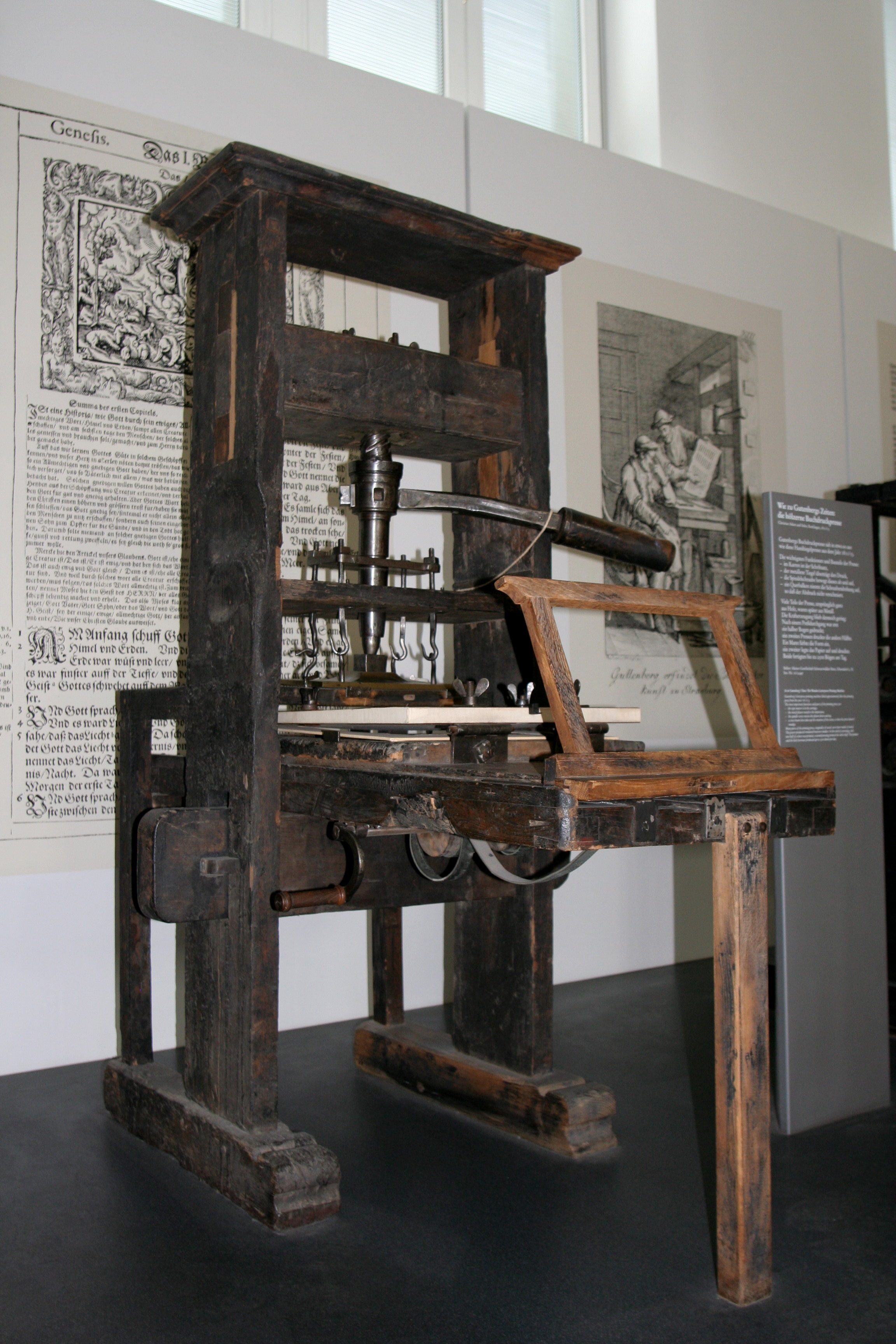
Hand-drafting, on the other hand, refers to using a straight edge, triangle, compass, french curve, etc... To create construction document level drawings (sure, you could create perspectives too). The art of hand-drafting is dead. The sooner educational institutions accept that the sooner we can all move forward. Sure it is important to know how to read and use a scale, but that can be taught without a drafting board. Teaching architecture student's hand-drafting (not hand-sketching) is equivalent to teaching publishers how to use this...
In summation, I believe we need to differentiate hand-sketching from hand-drafting and eliminate the latter.
/end rant
P.S. I will have a later post digging into Phil's concept of the social aspect of architecture in the future....
Phil's post was timely because I recently had a discussion with a professor of mine about Revit and school (him and I have constant "debates" about technology and design...). My professor exclaimed how everyone in his first year class was already using Revit. I said, "That's great!". He shook his head and disagreed. When I asked why he disagreed he said they whine and complain the second he asks them to draw things the old fashioned way (with a pencil and paper).
I am still not sure if he was making them "hand-draft" or "hand-sketch" but I think a distinction between the two must be made. Hand-sketching will always be around and is a key part of design. Even myself, The Revit Kid, use lots of hand sketches during the design process (as you can see in some of the projects I have posted here on the blog). By hand-sketching I am talking about freehand, no straight edge (maybe a scale to quickly mark sizes), and unrestricted drawing.
Hand-drafting, on the other hand, refers to using a straight edge, triangle, compass, french curve, etc... To create construction document level drawings (sure, you could create perspectives too). The art of hand-drafting is dead. The sooner educational institutions accept that the sooner we can all move forward. Sure it is important to know how to read and use a scale, but that can be taught without a drafting board. Teaching architecture student's hand-drafting (not hand-sketching) is equivalent to teaching publishers how to use this...
In summation, I believe we need to differentiate hand-sketching from hand-drafting and eliminate the latter.
/end rant
P.S. I will have a later post digging into Phil's concept of the social aspect of architecture in the future....
Friday, October 12, 2012
Revit Tip - Construction Schedules
I have been meaning to post this tip but kept forgetting. If you are looking to create some quantity take-off schedules don't waste your time doing them from scratch!
Autodesk decided to have a whole bunch of really useful schedules hidden inside their "Construction Template". When you start Revit and create a new project chose the "Construction" template and take a look at all the neat schedules!
Oh, and you can simply copy and paste them in the project browser to your new project!
Autodesk decided to have a whole bunch of really useful schedules hidden inside their "Construction Template". When you start Revit and create a new project chose the "Construction" template and take a look at all the neat schedules!
Oh, and you can simply copy and paste them in the project browser to your new project!
Thursday, October 4, 2012
Creating Custom Families in Revit 2012 / 2013 - Metric Edition
Labels:
creation,
ebook,
families,
little details count,
revit book,
revit ebook,
revit families

I posted about Michael's eBook on Revit families a little while ago... He recently released metric versions of the eBook for Revit 2012 and Revit 2013.... Oh, and be sure to check out the Forward in the Revit 2012 Metric version ... You may recognize the author.
Tuesday, October 2, 2012
Holy Reference Lines! - Corinthian Column in Revit
Labels:
classical revit,
corinthian,
corinthian column revit,
paul aubin,
revit classics,
revit columns,
revit tip,
revit tutorial
I posted about Paul Aubin's adventures in classical architecture and now you all get to see a video! Paul recorded a great 11 minute video about his Corinthian column and how he made the capitol.
Click here to see the video....
WARNING: It may blow your mind... and all the green reference planes may make you sick...
Click here to see the video....
WARNING: It may blow your mind... and all the green reference planes may make you sick...
Wednesday, September 26, 2012
KarelCAD Free Revit Training Videos
Labels:
revit tips,
revit tutorial,
revit tutorials,
what revit wants
Luke posted about this series of videos and they may be helpful to some of you... I personally think you should check out the 2013 suite workflow videos. Cool Stuff.
Check out Luke's post and the video's here...
Check out Luke's post and the video's here...
Tuesday, September 25, 2012
BIM Summit - Qatar
Labels:
BIM,
bim summit,
bim summit qtar
I have been following Stephen's posts all week while he attends the "BIM Summit" in Qatar. I suggest you check it out to. Some interesting topics and discussions...
BIM Summit Qatar - Day One
BIM Summit Qatar - Day Two
BIM Summit Qatar - Day Three
BIM Summit Qatar - Day Four
BIM Summit Qatar - Day One
BIM Summit Qatar - Day Two
BIM Summit Qatar - Day Three
BIM Summit Qatar - Day Four
Tuesday, September 18, 2012
Free Revit Tutorials - Create a House (CAD Clips)
Labels:
cad clips,
revit house,
revit rocks,
revit tips,
revit tricks,
revit tutorial,
revit tutorials
Daryl, over at CAD Clips and Revit Rocks, has released over 14 hours of free Revit training videos.... They are recorded using Revit 2009 (pre-ribbon) but a lot of stuff still applies.
Click here to check out the tutorial series now...
In this series we will use a ‘work in progress’ approach to develop the series over a period of time.
Here are the main objectives:
Custom Families, Clay Tile, Materials, Lighting, Rendering, Cameras, Site and Toposurfaces.
Utilize a ‘Santa Barbara California’ modeling theme to keep it interesting.
Drill down into the new Mental Ray Rendering tools and Materials.
Take advantage of the CADclips supplied Content File which contains ALL the custom families in this series.
Learn to create the custom families yourself, from scratch.
We cover everything from Spanish Clay Tile Roofing to Topo Surfaces and Wall Scallops as we dress up the outside of our Santa Barbara models.
Click here to check out the tutorial series now...
Sunday, September 16, 2012
The Revit Kid Project - Early Childhood Magnet School
Labels:
prezi,
revit project,
revit school,
school project,
school revit,
the revit kid project,
university of hartford
Because I know how much I love seeing other's Revit projects I will continue to share some of mine. This project was interesting in that my professor only gave us 5 days to design and present it (that is on top of working and 3 other classes!).
Given the time frame I took an interesting approach by nailing down the concept and a bubble diagram first and then building the Revit model... I actually brought in this concept sketch to Revit and using the bubble diagram (and all the ideas I had in my head) I quickly created the Revit model.
 I then made the final hand sketched floor plan using the Revit model! I know that sounds strange but it actually worked out really well.
Enjoy... Just click the arrows to the right and it will present in the correct order.
Click here to view my Bloomfield Early Childhood Magnet School presentation....
Given the time frame I took an interesting approach by nailing down the concept and a bubble diagram first and then building the Revit model... I actually brought in this concept sketch to Revit and using the bubble diagram (and all the ideas I had in my head) I quickly created the Revit model.

Enjoy... Just click the arrows to the right and it will present in the correct order.
Click here to view my Bloomfield Early Childhood Magnet School presentation....
Friday, September 14, 2012
Classical Architecture and Revit - Paul Aubin
Labels:
classical revit,
paul aubin,
revit classics,
vintage revit
Paul Aubin published an awesome post you should all check out. I love seeing classical architecture modeled in Revit. I worked on a few projects in the past in which we renovated or added onto old buildings with intricate details, ionic columns, and you name it.... The file sizes were huge but it was a ton of fun...
Wednesday, September 12, 2012
Revit LT - The Revit Kid's Perspective
Labels:
autodesk revit lite,
autodesk revit lt,
revit lt
I have been sort of sitting on this post for sometime now to give myself a chance to think, research, and form an opinion about the release of Revit LT from Autodesk.
This product launch appeared to create much debate in the past week or so between those for and those against it... The epitome of these debates can be found in the contrasting blog posts at the Revit Forum Blog and at Revit Fact Check. I urge you to read both of those posts entirely after reading the features list (or "non-features" list) and try to forge your own opinion.
My opinion, you ask? Personally, I just don't get it. I understand both the for and against arguments but I don't understand the value Revit LT will add to Revit itself. A perfect example can be seen in the Revit Wiki.... Carefully read this workflow Autodesk published... Your thoughts? My thought's were "WTF?".
Having started using Revit in a "small firm" (we started with 5 people and when I left there were 3). The type of work we did was similar to what Autodesk claims Revit LT would cater towards. Well, guess what.... We used Revit Architecture! We used plenty of the features that don't fully exist in Revit LT (worksharing being one of the main components... It was great! We couldn't "overwrite" each others CAD files.. WOOHOO). I will stop there because I did not want this post to be a list of features that should or should not exist in Revit LT.
I don't have the numbers, and maybe one my readers do, but how many AutoCAD LT users ended up buying full blown AutoCAD? Any AutoCAD LT users I know have been using it for years... It is great to make Revit more "affordable" but at what cost? Will these users actually become Revit users!? Will the lack of worksharing and other features create a CAD workflow in a Revit package??
With the right amount of Revit knowledge and workflow implemented on a project (even a little addition to a house) I know for a fact that the ROI of using Revit will pay for a full version very quickly... So what is Revit LT actually doing? What will it become? What good or evil will it create? We will have to wait and see...
This product launch appeared to create much debate in the past week or so between those for and those against it... The epitome of these debates can be found in the contrasting blog posts at the Revit Forum Blog and at Revit Fact Check. I urge you to read both of those posts entirely after reading the features list (or "non-features" list) and try to forge your own opinion.
My opinion, you ask? Personally, I just don't get it. I understand both the for and against arguments but I don't understand the value Revit LT will add to Revit itself. A perfect example can be seen in the Revit Wiki.... Carefully read this workflow Autodesk published... Your thoughts? My thought's were "WTF?".
Having started using Revit in a "small firm" (we started with 5 people and when I left there were 3). The type of work we did was similar to what Autodesk claims Revit LT would cater towards. Well, guess what.... We used Revit Architecture! We used plenty of the features that don't fully exist in Revit LT (worksharing being one of the main components... It was great! We couldn't "overwrite" each others CAD files.. WOOHOO). I will stop there because I did not want this post to be a list of features that should or should not exist in Revit LT.
I don't have the numbers, and maybe one my readers do, but how many AutoCAD LT users ended up buying full blown AutoCAD? Any AutoCAD LT users I know have been using it for years... It is great to make Revit more "affordable" but at what cost? Will these users actually become Revit users!? Will the lack of worksharing and other features create a CAD workflow in a Revit package??
With the right amount of Revit knowledge and workflow implemented on a project (even a little addition to a house) I know for a fact that the ROI of using Revit will pay for a full version very quickly... So what is Revit LT actually doing? What will it become? What good or evil will it create? We will have to wait and see...
Monday, September 10, 2012
BIMStop Guide to BIM on iPad
Labels:
BIM,
bim guide,
bimstop,
guide to bim
A neat little freebie from BIM Stop... It's worth checking out...
http://www.bimstop.com/blog/bimstop-guide-to-bim-now-on-ipad/
This new interactive guide to BIM works on iPads and iPhones, and contains amazing dynamic content such as interactive 3D building information models and BIM objects. Here’s some screenshots from the interactive book app, once again we’ll be updating and adding to it regularly along side our PDF version.
http://www.bimstop.com/blog/bimstop-guide-to-bim-now-on-ipad/
This new interactive guide to BIM works on iPads and iPhones, and contains amazing dynamic content such as interactive 3D building information models and BIM objects. Here’s some screenshots from the interactive book app, once again we’ll be updating and adding to it regularly along side our PDF version.
Tuesday, September 4, 2012
Custom Revit Families Book - Revit 2013
Labels:
little details count,
revit book,
revit family book
I mentioned a little while ago about Michael's book that teaches Revit family creation. Well, there is an updated version for Revit 2013 that you should check out as well....
Click here to read the previous post about the book and Michael.
Click here to check out the book itself.
Don't forget to mention that you heard about the book from "The Revit Kid.com!" during checkout.
Click here to read the previous post about the book and Michael.
Click here to check out the book itself.
Don't forget to mention that you heard about the book from "The Revit Kid.com!" during checkout.
Sunday, September 2, 2012
KubeGL - View Autodesk 360 Cloud Panorama's Offline
So you are using Autodesk 360 Cloud rendering to create nifty little panorama's and you want to view those panoramas outside of the Autodesk 360 website.... Well, it is very easy to do....
- Log onto Autodesk 360 Cloud Rendering and download your panorama as a .jpeg.
- Download KubeGL.exe
- Run KubeGL.exe
- Select your .jpeg and click OK.
And there you have it! Spin, zoom, and enjoy... Oh, and wait for Autodesk to up the quality of Panoramas...
Friday, August 31, 2012
New Autodesk BIM Curriculum / Materials
Getting Ready to Go Back to School: Autodesk
BIM Learning Resources
Building Information Modeling Tools to Help You Build the
Future
Check out the newly updated Autodesk® BIM Workshop - the
online learning resource center with educational tools for architecture, civil
engineering, structural engineering, and construction management studies. The
site is designed so students can easily drill down into a specific discipline
or field-of-study to access a wide selection of videos, tutorials, and interactive
learning tools.
Check out all the great learning material available
to you on the BIM Workshop, just in time for Back to School!
This curriculum is designed to help prepare architecture,
engineering, and construction management students for professional practice by
exploring BIM sustainable design practices along with integrated project
delivery (IPD) concepts. Students and graduates can more fluidly design and
communicate, test, and plan using BIM models in an IPD framework. The BIM curriculum
contains student workbooks that highlight essential concepts and learning goals
and are accompanied by comprehensive learning tools, instructional videos, and
datasets.
The new Autodesk® Structural
Engineering curriculum was created to introduce Structural Design and Analysis
to help students efficiently design, analyze, document, and build their
projects. The student workbooks, tutorial videos, and datasets support key that
support the complete workflow from building structures to cloud computing to
analysis and documentation.
Monday, August 27, 2012
BIM Execution Plan - The Beck Group
Labels:
BEP,
BIM Execution Plan,
the beck group
Following the trend of an older post which focused on the idea that people love seeing examples of BIM Execution Plans (BEP) I thought I would share another one that popped up on Twitter. Aaron Maller, of The Beck Group, was kind enough to share their BEP.
So far my favorite part is the terms used in the title:
"Design and Construction Model Procurement and Coordination Practices"
... Juicy ...
Wednesday, August 22, 2012
Revit 2013 - New Level Properties
Labels:
level properties,
revit 2013,
revit levels

Elliptipar Lighting Revit Models
Labels:
creation,
elliptipar,
lighting fixtures,
presentation,
Revit Content,
revit content download,
revit families,
revit lighting,
revit lights
For those of you seeking out some nice lighting fixtures to use Elliptipar has some great Revit Models. Not to mention their lights are pretty sexy to begin with... They also have two levels of model (for and not for rendering).
Check them out here:
http://elliptipar.com/bimrevit.aspx
Check them out here:
http://elliptipar.com/bimrevit.aspx
Name That Clash! - #BIMBattlefield
Labels:
clash,
clash detection,
clash detective,
interference,
revit clash
How many clashes can you find in the picture below?


Tuesday, August 21, 2012
Revit Toposurface Sub-Region Annoyance #BIM Battlefield
Labels:
revit,
revit 2013,
revit topography,
toposurface
Dear Autodesk,
Please allow the "create similar" command to create a new sub-region and not an entirely new toposuface.
Thanks,
- Jeff
Please allow the "create similar" command to create a new sub-region and not an entirely new toposuface.
Thanks,
- Jeff
Friday, August 17, 2012
Revit View Template Check Box Annoyance
Labels:
autodesk,
revit 2012,
revit 2013,
view templates,
wishlist
Dear Autodesk,
Please add a "Select All / Deselect All" for these check-boxes....

Please add a "Select All / Deselect All" for these check-boxes....

Just saying...
Wednesday, August 15, 2012
Revit Tip - Revit Families Above the Cut Plane
Labels:
creation,
family creation,
revit families,
revit tip,
revit tutorial
Just something to keep in mind when you are selecting what Category your family will be. Found this little gem from The Revit Clinic:
Click here to see the rest of the post....
For component families this is determined by the family category. The following component family categories will appear in the view even when above the cut plane:
-Casework
-Generic Model
-Structural Columns
-Windows
-Generic Model
-Structural Columns
-Windows
Click here to see the rest of the post....
Tuesday, August 14, 2012
Revit, Augmented Reality, and Showcase ... Awesome
Labels:
augmented reality,
autodesk showcase,
revit ar
We all knew it was coming sooner or later.... I haven't tried it out yet but I will soon. Augmented Reality is now a Showcase plug-in available in the lab...
OVERVIEW
Augmented Reality allows the ability to overlay semantically in context information (graphics, text, video, sound) on to a live video feed of the real-world in real-time.
Autodesk Showcase is already a gold standard for photorealistic high quality interactive 3D real-time rendering. With the Showcase 2013 Augmented Reality plug-in, it is now easier than ever to visualize showcase 3D models in the real-world as viewed through your web or video camera. With the Augmented Reality plug-in, Showcase scene environments can be more dynamic, allowing you to Imagine Design and Create in context to the world around you.
Click here to try it out now....
OVERVIEW
Augmented Reality allows the ability to overlay semantically in context information (graphics, text, video, sound) on to a live video feed of the real-world in real-time.
Autodesk Showcase is already a gold standard for photorealistic high quality interactive 3D real-time rendering. With the Showcase 2013 Augmented Reality plug-in, it is now easier than ever to visualize showcase 3D models in the real-world as viewed through your web or video camera. With the Augmented Reality plug-in, Showcase scene environments can be more dynamic, allowing you to Imagine Design and Create in context to the world around you.
Click here to try it out now....
Tuesday, August 7, 2012
Revit Families on Pinterest...
Labels:
creation,
pinterest,
Revit Content,
revit families
Great use of Pinterest and Revit...
I have been slowly getting into Pinterest and there are lots of things to like about it. It is great for pinning architectural ideas, common interests, and even Revit content! I can see many more architecture/Revit/BIM opportunities and ideas arising in the future. How about you?
I have been slowly getting into Pinterest and there are lots of things to like about it. It is great for pinning architectural ideas, common interests, and even Revit content! I can see many more architecture/Revit/BIM opportunities and ideas arising in the future. How about you?
Thursday, August 2, 2012
Architecture vs. Structure ... Who "Owns" the Grids
Labels:
copy/monitor,
grid,
revit architecture,
revit grid,
revit structure
I am going to put it out there... some architects may cringe... some engineers may rejoice.
Where I work it seems to be an ongoing battle between who "owns" the columns grids. Some of the architects want complete control throughout the entire project. Some could care less. Some engineers refuse to copy the architect's grids... Others work with them... In the end, it always seem to end up with two sets of grids. One independent grid owned by the architect and drawn inside the architecture model. The other owned by the engineer and drawn inside the structural model.
Let's break this habit NOW!
I propose a solution. We use a basic three phase workflow (SD, DD, CD). During the SD and beginning of the DD phase the architect will draw the grids. This will allow for design intent, some control of where columns would like to go, and the ability to adjust them at will. Once the architect considers the grids to be sufficient the engineer will link in the model and re-draw the grids (that's right... re-draw... not copy/monitor).
I am proposing that once the structural model has its grids in place the architect's grids will be removed and structural's grids will be copy/monitored (***Edit*** No need to REMOVE the architects grids because you can simply set up a "monitor" relationship between them. See here.). That's right... I said it. The architect should copy/monitor the structural model's grids into the architectural model.
Because the only things that will be locked to a grid in the architectural model will most likely be dimensions and column enclosures a change in the grid location will have less of an unwanted modeling impact than on the structural model. Of course, because of the copy/monitor a notification will make the architect aware of the change and... well... he or she will have to COMMUNICATE with the engineer....
Am I really that crazy??
Where I work it seems to be an ongoing battle between who "owns" the columns grids. Some of the architects want complete control throughout the entire project. Some could care less. Some engineers refuse to copy the architect's grids... Others work with them... In the end, it always seem to end up with two sets of grids. One independent grid owned by the architect and drawn inside the architecture model. The other owned by the engineer and drawn inside the structural model.
Let's break this habit NOW!
I propose a solution. We use a basic three phase workflow (SD, DD, CD). During the SD and beginning of the DD phase the architect will draw the grids. This will allow for design intent, some control of where columns would like to go, and the ability to adjust them at will. Once the architect considers the grids to be sufficient the engineer will link in the model and re-draw the grids (that's right... re-draw... not copy/monitor).
I am proposing that once the structural model has its grids in place the architect's grids will be removed and structural's grids will be copy/monitored (***Edit*** No need to REMOVE the architects grids because you can simply set up a "monitor" relationship between them. See here.). That's right... I said it. The architect should copy/monitor the structural model's grids into the architectural model.
Because the only things that will be locked to a grid in the architectural model will most likely be dimensions and column enclosures a change in the grid location will have less of an unwanted modeling impact than on the structural model. Of course, because of the copy/monitor a notification will make the architect aware of the change and... well... he or she will have to COMMUNICATE with the engineer....
Am I really that crazy??
Thursday, July 26, 2012
Revit Electrical Panel Madness - #BIMBattlefield
An interesting set of events have taken place in the past week or so about Revit Electrical Panel schedules and their calculations.
July 17, 2012
For me, the affair started with engineers at the firm I work for claiming the math was wrong. After some research and a deadline that had to be met my colleague, Doug, and I came up with a handout seen in the post.
July 24, 2012
The same day, Kyle Bernhardt publishes a very comprehensive post about all of the math that goes on behind the scenes of the Revit Electrical Panel Schedule. Personally, I do not have the electrical know-how to understand every piece of post so Doug and I sent it off to our engineers to read over. The response from our engineers was:
"If we
take the separate load per phase the math is correct. In real world we do not
have panels with single phase only. In any panel it will be 2 pole and three
pole loads. We can’t separate the electrons per phase."
July 25, 2012
Kyle Bernhardt publishes another post proclaiming that something has been done about his in the latest Revit 2013 update. Kyle states that "An update in Revit 2013 Update Release 1 makes this [computing per phase load demands] functionality possible..."...
I have not installed the update to Revit MEP 2013 yet to see exactly what it did (did it unlock the parameter or calculated values?) but it sounds like it might be a step in the right direction.
July 26, 2012
Doug and I would like to think that maybe, just maybe, the handout we posted here had some sort of effect on this chain of events. After all, we all need little victories fighting on the #BIMBattlefield.
Tuesday, July 24, 2012
Revit Tip - Select Element by Offset Height
Labels:
ceiling offset,
ceiling plan,
revit ceilings,
revit tip,
revit tutorial,
revit tutorials,
tutorials
Here is a nice little tip that I think will help many of you out. The example I am going to use is a ceiling. Let's say you have a bunch of 2x4 ACT ceilings in your model. They are all at varying heights. You want to take the one set of ceilings that are at, let's say, 10'-0", and lower them to 9'-4".
How do you select all those ceilings without selecting the others? A schedule! Check out the video below for the tip.
Topics Covered:
How do you select all those ceilings without selecting the others? A schedule! Check out the video below for the tip.
Topics Covered:
- Creating a Ceiling Schedule
- Sorting the Schedule by Height Offset.
- Grouping the height Offset..
- Changing the Height Offset of the Ceilings.
Saturday, July 21, 2012
Revit Tip - Quickly Find Warning [and Clash] Elements (What Revit Wants)
Labels:
clash detection,
revit section,
revit tip,
revit tutorial,
revit tutorials,
revit warnings,
section box
Great little tip/workflow from Luke. He uses some simple steps to find elements that appear in your warnings reports... I would take it a step further and say "why not use it for clash detection too!?". Just export the clash report and use the same steps...
Now, if only Revit would integrate Navisworks ability to zoom in and auto-show an element... Come on now!
Click here to view the tip/tutorial....
Now, if only Revit would integrate Navisworks ability to zoom in and auto-show an element... Come on now!
Click here to view the tip/tutorial....
Thursday, July 19, 2012
Creating Custom Revit Families Book
Labels:
creation,
family creation,
family guide,
revit family creation series,
revit tips,
revit tutorial
Michael Anonuevo, author of the Little Details Count website, has created an awesome book to help you create any Revit family you can imagine. The number of views my "Family Creation Series" of tutorials has received over the years illustrates the interest people have in creating families. Well, Michael takes family creation to a whole new level.
I have been fortunate enough to read through this eBook already and it is packed full of great information. For only 20 bucks you get 751 pages of fantastic content all related to Revit families. Not to mention Michael teaches you how to create an alto sax at the end... I am absolutely mystified by the amount of time this book must have taken to write.
I promise you that it is a 20 dollars you will not regret spending. Don't forget to mention that you heard about the book from "The Revit Kid.com!" during checkout.
Click here to read a PDF with a sample chapter and Steve Stafford's forward...
Click here to purchase the eBook...
I have been fortunate enough to read through this eBook already and it is packed full of great information. For only 20 bucks you get 751 pages of fantastic content all related to Revit families. Not to mention Michael teaches you how to create an alto sax at the end... I am absolutely mystified by the amount of time this book must have taken to write.
I promise you that it is a 20 dollars you will not regret spending. Don't forget to mention that you heard about the book from "The Revit Kid.com!" during checkout.
Click here to read a PDF with a sample chapter and Steve Stafford's forward...
Click here to purchase the eBook...
Wednesday, July 18, 2012
Revit Tutorial - Revision Trickery (Revit Alliance)
Labels:
revision clouds,
revisions,
revit alliance,
revit tip,
revit tutorial
Cool post from last year that I stumbled upon today...
As I was blog-stalking today, I saw Steve Stafford over at Revit OpEd posted aboutthe revisions on sheet dialog that is somewhat hidden in the sheet properties but helps with revisions schedules so much! It got me thinking I should post about some other little revision tricks that I think are hidden or people just don’t think about....
Click here to see the rest of the post and tutorial about Revisions, Clouds, Tags, and schedules.....
As I was blog-stalking today, I saw Steve Stafford over at Revit OpEd posted aboutthe revisions on sheet dialog that is somewhat hidden in the sheet properties but helps with revisions schedules so much! It got me thinking I should post about some other little revision tricks that I think are hidden or people just don’t think about....
Click here to see the rest of the post and tutorial about Revisions, Clouds, Tags, and schedules.....
The Revit Kid.com! is Now an Official Wiki Contributor
Labels:
autodesk wiki,
revit 2013 wiki,
revit help,
revit tips,
revit tutorials,
tutorials
I am excited to announce that The Revit Kid.com! is officially a contributor of the Autodesk Revit Wiki Help pages...
The idea of merging a Help File with a community driven Wiki is a great move on Autodesk parts (even if it still has some funky bugs). I look forward to contributing lots of information to the community and Revit Users abroad.
Tuesday, July 17, 2012
GTeam - Gehry Hits the Cloud with BIM
Labels:
BIM 360,
cloud bim,
gehry technologies,
open bim
Juliana, who jokingly referred to herself as "The Revit Grandma" in an email to me, pointed me to a very interesting link. Looks like Gehry Technologies is hitting the cloud... FOR FREE to try! I can't wait to give this a try later....
Greetings,
We are very excited here at Gehry Technologies to announce the public Free Preview launch of GTeam, our new cloud-based 3D, file management and project collaboration platform. Inspired by Frank Gehry’s vision of collaboration, GTeam was created specifically for Architecture, Engineering and Construction professionals using a 3D centric approach to project delivery. Unlike traditional file-sharing solutions, GTeam is purpose-built for the AEC industry to support the needs of BIM teams, with an open platform that enables collaboration regardless of the authoring tools being used by the individual participants.
Many of our early customers are having great success with GTeam and we hope you give GTeam a try on a few of your projects! You can try it free today with unlimited users, projects and storage.
About GTeam
GTeam is a new way for Architecture, Engineering, Construction professionals and Owners to collaborate and share project and 3D design information. Using GTeam as a central platform, you can easily share and view 3D models online, organize all your projects files in one place, and keep everyone on the same page!
Start your free trial
Click here to learn more about GTeam and to register for your free trial!
Click here for a list of features....
Looks like Autodesk's BIM 360 and Graphisoft's Open BIM may have a competitor... I wonder what the price margin will be...
Greetings,
We are very excited here at Gehry Technologies to announce the public Free Preview launch of GTeam, our new cloud-based 3D, file management and project collaboration platform. Inspired by Frank Gehry’s vision of collaboration, GTeam was created specifically for Architecture, Engineering and Construction professionals using a 3D centric approach to project delivery. Unlike traditional file-sharing solutions, GTeam is purpose-built for the AEC industry to support the needs of BIM teams, with an open platform that enables collaboration regardless of the authoring tools being used by the individual participants.
Many of our early customers are having great success with GTeam and we hope you give GTeam a try on a few of your projects! You can try it free today with unlimited users, projects and storage.
About GTeam
GTeam is a new way for Architecture, Engineering, Construction professionals and Owners to collaborate and share project and 3D design information. Using GTeam as a central platform, you can easily share and view 3D models online, organize all your projects files in one place, and keep everyone on the same page!
Start your free trial
Click here to learn more about GTeam and to register for your free trial!
Click here for a list of features....
Looks like Autodesk's BIM 360 and Graphisoft's Open BIM may have a competitor... I wonder what the price margin will be...
Free Revit Walls, Ceilings, and Details (USG Design Studio)
My buddy Nick sent me this link and I thought I would share.
The site is loaded with standard details, wall, floor, and ceiling constructions for FREE. You can filter walls by fire and sound rating, materials, all kinds of stuff. Really cool site and worth a look.
http://www.usgdesignstudio.com/
The site is loaded with standard details, wall, floor, and ceiling constructions for FREE. You can filter walls by fire and sound rating, materials, all kinds of stuff. Really cool site and worth a look.
http://www.usgdesignstudio.com/
Revit Tutorial - Fix the Electrical Panel Schedule Math
Labels:
electrical panel,
electrical panel schedule,
revit electrical panels,
revit MEP,
revit schedules,
revit tip,
revit tutorial
I have posted a handout from my colleague Doug Campbell sometime last year and it was received well. Here at the office when we arrive at some interesting Revit issues, workaround, or tips, Doug usually takes the time to make a handout to send to all the Revit user.
We recently ran into some funky math that Revit MEP has built into it's Electrical Panel Schedule. I wont go any further because Doug does so in the handout but basically the Panel Schedule divides by he wrong number...
Thursday, July 12, 2012
An Outlook for the AEC Industry from Futurist Edie Weiner
Labels:
Edie Weiner,
future of AEC
Very cool article by a renowned "futurist"... That's right... a "Futurist"...
A good quote here:
“Physical space is moving to cyber space,” believes Weiner, thanks to virtual reality and CAD/CAM technologies. Not only are these technologies impacting the way we work, but they are also altering the structure of our professions. “The architectural profession was traditionally a top-down world,” according to Weiner, “but it has shifted to a bottom-up culture” that allows even recent graduates to excel based on their expertise in these technologies.
Also, "being blue" is a great notion to take away....
Read the article here to know what I am talking about...
A good quote here:
“Physical space is moving to cyber space,” believes Weiner, thanks to virtual reality and CAD/CAM technologies. Not only are these technologies impacting the way we work, but they are also altering the structure of our professions. “The architectural profession was traditionally a top-down world,” according to Weiner, “but it has shifted to a bottom-up culture” that allows even recent graduates to excel based on their expertise in these technologies.
Also, "being blue" is a great notion to take away....
Read the article here to know what I am talking about...
Wednesday, July 11, 2012
Article: Phillip G. Bernstein On The Future of Design Practice - Technology, Bim - Architect Magazine
Labels:
AEC,
BIM,
phil bernstein
Phillip G. Bernstein On The Future of Design Practice - Technology, Bim - Architect Magazine
http://www.architectmagazine.com/technology/phillip-g-bernstein-talks-about-the-future-of-design.aspx?cid=ANW:070212:FULL
Some good pointers and insight by Uncle Phil...
http://www.architectmagazine.com/technology/phillip-g-bernstein-talks-about-the-future-of-design.aspx?cid=ANW:070212:FULL
Some good pointers and insight by Uncle Phil...
Revit Tip - Curtain Wall Grids Appear After Wall Re-Sizing
I have had numerous posts about curtain walls throughout this blog so I figured I would add another little tip. This is just one that can remove much of the annoyances I am sure you have run into in the past.
First, I highly suggest using a curtain wall type that does not have any grid lines predefined right from the start. I can almost guarantee that you will be unpinning and manipulating at least one grid line in each of your curtain walls. Once you do that, adn you start changing the length or height of the curtain wall... Good luck to you... Grids will start appearing out of no where, panels will get replaced, doors will disappear, and fluffy kittens will die...
Before we kill anymore fluffy kittens follow these steps for curtain walls that were drawn with a pre-defined grid system and giving you a headache now:
First, I highly suggest using a curtain wall type that does not have any grid lines predefined right from the start. I can almost guarantee that you will be unpinning and manipulating at least one grid line in each of your curtain walls. Once you do that, adn you start changing the length or height of the curtain wall... Good luck to you... Grids will start appearing out of no where, panels will get replaced, doors will disappear, and fluffy kittens will die...
Before we kill anymore fluffy kittens follow these steps for curtain walls that were drawn with a pre-defined grid system and giving you a headache now:
- Select all the internal grids of the curtain wall.
- Unpin them.
- Select the curtain wall..
- Change the wall to a wall type without any defined grid pattern.
Now take a deep breath and smile.
Autodesk 360 is Going Mobile
Good find from Alan...
Autdoesk is looking to go mobile with their 360 cloud services and they are looking for your input on devices to use.
Click here to sign up for more information and to submit your device type.
Autdoesk is looking to go mobile with their 360 cloud services and they are looking for your input on devices to use.
Click here to sign up for more information and to submit your device type.
Wednesday, July 4, 2012
Autodesk Activation Problem - Solved
Labels:
activation nightmare,
autocad activation,
autodesk activation,
autodesk products,
Register Today (Product Activation Wizard) displays only two radio buttons,
revit activation
If you remember a few weeks ago I had an activation nightmare when trying to activate Revit 2013. Every time I would run the activation process I would get a blank screen or radial buttons off the screen. After research and trial and error I finally got the damn thing to activate.
Well, fast forward to today. I am fresh off of RTC USA and installing some new software out of pure inspiration. This software includes Navisworks Manage 2013, 3D Max 2012 and 2013... and CryEngine 3 (thanks for the class Marcello!). Well, it turns out the activation issue doe not only effect Revit. In fact, all the setting and tweaks to HTML files I made for the Revit activation were overridden by me new Autodesk installs!
Well, for the sake of my sanity and yours I decided to take a few minutes and tweak every HTML file that has to do with the Autodesk installs. For subscribing to this blog you can download the files and never have to tweak the HTML codes again....
So from now on when you try and activate any Autodesk product and you are staring at a blank window, offset radial buttons, or nothing at all give this a try. Simply use the zip file I created. Extract the files somewhere safe. Copy and paste them into the following directory:
C:\Program Files\Common Files\Autodesk Shared\AdLM\R5\en-US\Webdepot
Notice where I highlighted the "R5" in the directory location. From what I can tell "R5" has to do with the 2013 products and there will be an R4 and R3 folder if you have 2010 and 2011 products. You will have to do the copy and paste into each "Web Depot" folder of each "R..." folder. It will ask you to give permission and if you want to replace the current files. Say yes. Launch your Autodesk and run the activation sequence again.
One little caveat. You have to re-copy and replace these HTML files every time you install a new product... So save the zip file for sure.
Subscribe to this blog FREE and download the working HTML files:
Tuesday, July 3, 2012
Revit Tutorial - Walls the Follow Topography (Intersection Method) #RTCUSA
Labels:
revit technology conference,
revit tips,
revit topography,
revit tutorial,
revit walls,
RTC 2012,
wall and topography
As I mentioned earlier I was fortunate enough to attend 2 out of 3 of Marcello's RTC classes. The second, and final, class is when he introduced the intersection method. It is one of those things where after you see it you say, "Duh! Why didn't I think of that?!". Well, Marcello was nice enough to post a little tutorial explaining how he used the intersection method and another little workaround to make the bottom of a wall follow the topography lines in Revit...

Click here to see the tutorial....
Oh, and I urge you all to follow his blog. It might not have 3 posts a day but the quality of every post is worth a look... I mean, just look at this image of his Revit cow.... Insanity.

Click here to see the tutorial....
Oh, and I urge you all to follow his blog. It might not have 3 posts a day but the quality of every post is worth a look... I mean, just look at this image of his Revit cow.... Insanity.

Sunday, July 1, 2012
Day 4 - Revit Technology Conference 2012 #RTCUSA
Labels:
RTC
I am now home and reflecting on the past four days and it's overwhelming to contemplate what happened. The virtual typhoon of information that washed over me the past four days is unimaginable to anyone but an attendee of RTC.
My final day at RTC started with a bang as Marcello explained "the intersection method" he uses to place structural beam on complex surfaces. By the end of the class he placed some beams around the surface of a cow he modeled inside Revit.
After Marcello opened my eyes to some new ways of using old tools Tim Waldock made us all feel like we were in high school trigonometry and he was the teacher... But with awesome images. Tim used the new "repeat" tool in Revit 2013 along with adaptive components and the new "divided line" tool to do some really cool things (like make an octopus building).
The day went on and ended with a formal dinner consisting of a three course meal and lots of free wine (and quite a few bottles ended up at our table...)

My final day at RTC started with a bang as Marcello explained "the intersection method" he uses to place structural beam on complex surfaces. By the end of the class he placed some beams around the surface of a cow he modeled inside Revit.
After Marcello opened my eyes to some new ways of using old tools Tim Waldock made us all feel like we were in high school trigonometry and he was the teacher... But with awesome images. Tim used the new "repeat" tool in Revit 2013 along with adaptive components and the new "divided line" tool to do some really cool things (like make an octopus building).
The day went on and ended with a formal dinner consisting of a three course meal and lots of free wine (and quite a few bottles ended up at our table...)

For my first Revit Technology Conference experience I could not have had a better time. I met such great people and interacted in some very informative classes. Overall, the feeling of being in the presence of 400 people who are all experts in what I am passionate about was nostalgic to say the least. I highly recommend you find a way to go next year. Personally, I think a larger group of students should try to attend because I believe we are the ones who will drive the industry in the directions we discussed for the past four days(they do have a student and professor price reduction).
Oh, and if you do plan on going next year I highly advise you not to book a flight on Sunday morning any earlier than at least 11 A.M....
Saturday, June 30, 2012
Day 3 - Revit Technology Conference 2012 #RTCUSA
Labels:
automation,
cea,
cryengine,
revit technology conference,
RTC,
rtc2012,
rtcna,
rtcusa
Today marks day 3 of my Revit Technology Conference adventure and boy was it a cracker. I started the day with a 9:00AM Lab about Vasari and Dynamo given by Matt Jezyk (click here to read about it). I missed my second class because I was getting ready for my lab. I did make it to Scott Davis's (@scottddavis) lecture on "Rapid Energy Modeling". Scott, Matt Jezyk, and myself all happened to be speaking about practically the same thing, but I think we all have very different ways of speaking about it. Scott did a great job and jammed an incredible amount of information in a short period of time.

Finally, it was time for my very first Revit Technology Lab titled "Revit Energy Analysis Workflow: Analyzing Your Model from Concept to Reality". When the conference in over I will post the handout. If you don't count the internet not allowing anyone to sign on to Autodesk 360 I'd say it went pretty well. The room was full and everyone seemed very engaged. For those of you who sat in on the lab thanks for coming and I hope you took something away from it. I plan on breaking down my lab content into a smaller video series here on The Revit Kid.com for all of you who did not get to attend. So look out for that sometime this summer.
The last class I sat in on today was freaking awesome to say the least. Marcello Sgambelluri, or "the elephant man" according to Jim Balding, demonstrated the possible workflow of Revit to 3D Max to the CryEngine 3 game engine. All I kept thinking about is how I cannot wait to throw my masters thesis building into CryEngine and blow it up with some grenades... Yeah... It is that cool. I am sure I will be talking more about this considering the amount of real time visualization software I have been exploring lately...(I already bought the book...)
Looking forward to some cool lectures tomorrow about adaptive components and extending my BIM models to shop/fabrication.
Until then I will leave you with one Pro and one Con of today:
- Con: The Internet is absolutely atrocious.
- Pro: This awesome creation we had for breakfast...

Friday, June 29, 2012
Autodesk Releases New Dynamo Add-In for Vasari
Labels:
automation
I was fortunate enough to sit in on a 75 minute lab given by Matt Jezyk of Autodesk (if you don't know who he is just Google him). Matt ran through Dynamo while we got to follow along. Dynamo can be very powerful and I have become a believer (both as a user and programmer). The idea of visually seeing the code not only makes it easier to comprehend but it teaches you the code as well. I encourage all of you to download Vasari and Dynamo and give it a try...
Click here to download Vasari and Dynamo
Click here to view the tutorials and follow along to dynamo...
Click here to download Vasari and Dynamo
Click here to view the tutorials and follow along to dynamo...
Thursday, June 28, 2012
Day 1 & 2 : Revit Technology Conference 2012 - #RTCUSA
Labels:
RTC
I am here in Stone Mountain, Georgia and so far it is a blast. Yesterday was mostly traveling followed by watching the soccer game. The night ended with a Speaker and Sponsor event loaded with alcohol and appetizers.
Since 9:00 this morning I have been sitting in labs and lectures that have been very informative. The first lab was by Brian Mackey and ran through some nifty tips and tricks within a Navisworks. The more I become exposed to and use Navisworks the more I believe that every Revit users should now at least the basics of Navisworks.
Currently, I am listening to John Tocci, Jr. (@jtocci2) of Gilbane. All I can say is that every Principal and Partner of design firms should be in this lecture. It is all the stuff us BIM-evangelists have been saying for years but said by a contractor... John opened up with the crazy idea that we create a 3D virtual model, make 2D documents out of it, print them on hundreds of sheets of paper and stamp them with liquid stamps, and then try to build the building again in 3D (reality)!?
Anyways... Tonight is another social function with more alcohol. I'm hoping to get back to the room early and run through the material for my lab tomorrow.
Don't forget to follow my adventures he on Twitter @TheRevitKid and follow the event at #RTCUSA
Since 9:00 this morning I have been sitting in labs and lectures that have been very informative. The first lab was by Brian Mackey and ran through some nifty tips and tricks within a Navisworks. The more I become exposed to and use Navisworks the more I believe that every Revit users should now at least the basics of Navisworks.
Currently, I am listening to John Tocci, Jr. (@jtocci2) of Gilbane. All I can say is that every Principal and Partner of design firms should be in this lecture. It is all the stuff us BIM-evangelists have been saying for years but said by a contractor... John opened up with the crazy idea that we create a 3D virtual model, make 2D documents out of it, print them on hundreds of sheets of paper and stamp them with liquid stamps, and then try to build the building again in 3D (reality)!?
Anyways... Tonight is another social function with more alcohol. I'm hoping to get back to the room early and run through the material for my lab tomorrow.
Don't forget to follow my adventures he on Twitter @TheRevitKid and follow the event at #RTCUSA
Autodesk Fabrication Website
The more owners are requiring as-built 3D models the more sub-contractors will have to create them too. Believe it or not... A lot of subs are already doing this (just in software that doesn't really interact with our models).
Show them this site!!!
Show them this site!!!
Tuesday, June 26, 2012
New Banner Image
I would like to make a shout out to a dedicated reader named Andrew Norton. Andrew emailed me explaining how much help the blog has been to him and he offered to make a new banner (not sure if he just didn't like my banner or had some ideas for another... I won't take it personally).
Well, he designed and created the banner you now see at the top of the blog. Implementing the "lock" from Revit and my T-shirts with the Revit Kid logo was an awesome idea.
Thanks Andrew. Let Andrew and myself know if you like it by commenting below.
Well, he designed and created the banner you now see at the top of the blog. Implementing the "lock" from Revit and my T-shirts with the Revit Kid logo was an awesome idea.
Thanks Andrew. Let Andrew and myself know if you like it by commenting below.
RTC North America 2012 - Tomorrow!
Labels:
revit technology conference,
RTC,
rtc2012
I will be getting up bright and early tomorrow morning and heading to Atlanta for the Revit Technology Conference. For those of you going, I look forward to meeting you! For those of you not attending, make sure to keep an eye on the blog here and also to follow me on Twitter @TheRevitKid . I will be trying to post as much as possible on both sites.
Also, don't forget to sign up via email to the blog in case you always forget to check the site itself (sign up next to the red arrow to the right ----->>>>>>)
Four days of Revit discussion, labs, complaints, and brilliance! Looking forward to it!
Also, don't forget to sign up via email to the blog in case you always forget to check the site itself (sign up next to the red arrow to the right ----->>>>>>)
Four days of Revit discussion, labs, complaints, and brilliance! Looking forward to it!
Monday, June 25, 2012
Lumion 2.2 Released - FREE FOR STUDENTS!
Great news for my fellow students... We get to use Lumion for FREE!
Click here to read more about the new Lumion 2.2
Click here to sign up for Lumion 2.2 FREE as a Student or Teacher....
P.S. Artlantis also has a Student download...
Now... How about Autodesk cranks up their cloud rendering units for us students...? No?
Articles: BIM: A change in the design process?
Labels:
architectural design,
BIM,
bim fees,
bim process,
design process,
fees,
nbs
Here are a couple interesting articles that go along with a recent post I published...
BIM: A change in the design process?
http://www.thenbs.com/topics/BIM/articles/bimAChangeInTheDesignProcess.asp
What will BIM mean for design fees?
http://www.thenbs.com/topics/BIM/articles/whatwillBIMMeanForDesignFees.asp
BIM: A change in the design process?
http://www.thenbs.com/topics/BIM/articles/bimAChangeInTheDesignProcess.asp
What will BIM mean for design fees?
http://www.thenbs.com/topics/BIM/articles/whatwillBIMMeanForDesignFees.asp
Wednesday, June 20, 2012
Revit Tutorial - Create Parametric Complex Structural Forms
Nice tutorial over at BIM Technologist... I have to say the reason I do videos is because it takes FOREVER to write out tutorials... I don't know what the Revit book writers are thinking...
Open up a new family template and create a couple of reference lines. We will use these lines to set work planes once we create our forms. .... Continue reading...
Tuesday, June 19, 2012
Revit Tip - Create and Share Materials
Labels:
material editor,
materials,
presentation,
revit 2013,
revit materials,
revit tip,
revit tutorial
Luke linked to a great post over at AEC Tech Talk about Revit 2013 and the ability to share material libraries internally...
Autodesk 2013 products allow you to create a library that contains the most commonly used and standard materials within an organization.
It can be daunting and confusing to users when they go to specify a material for something and there are many materials from which to choose. Autodesk provides many materials Out-Of-The-Box (OOTB), companies will develop materials in-house, and materials may be downloaded, all of which creates a large collection of materials. This article will describe how you can create a central library on the company server in 3 easy steps, from which users can select the preferred material.
..... Click here to see the post....
Autodesk 2013 products allow you to create a library that contains the most commonly used and standard materials within an organization.
It can be daunting and confusing to users when they go to specify a material for something and there are many materials from which to choose. Autodesk provides many materials Out-Of-The-Box (OOTB), companies will develop materials in-house, and materials may be downloaded, all of which creates a large collection of materials. This article will describe how you can create a central library on the company server in 3 easy steps, from which users can select the preferred material.
..... Click here to see the post....
Microsoft Surface Pro - Revit on a Tablet?!
Labels:
microsoft surface,
revit mobile,
revit tablet,
revit touch,
surface,
surface pro
In case anyone missed it Microsoft officially announced an actually iPad competitor. That's right, they did it... And I have to say I am a bit excited. Personally, I have had my iPad for three years now and used it every single day. There is no doubt at the success of an iPad and the market it dominates.
Why is the "Surface" announcement so exciting? Well... the Pro version runs full blown Windows! And, as mentioned in the announcement below it can "Run windows programs... like Autodesk...". Microsoft may have been a tad bit off in saying "Autodesk" is a program but the fact that they even said it alongside Adobe is pretty cool.
I have created and edited Revit models on the iPad using LogMeIn numerous times and have gotten pretty good at it but there are definitely pros and cons. I look forward to seeing the exact specs of the i5 Pro edition of Surface... It will surely be an interesting year or so between Apple and Microsoft.
Why is the "Surface" announcement so exciting? Well... the Pro version runs full blown Windows! And, as mentioned in the announcement below it can "Run windows programs... like Autodesk...". Microsoft may have been a tad bit off in saying "Autodesk" is a program but the fact that they even said it alongside Adobe is pretty cool.
I have created and edited Revit models on the iPad using LogMeIn numerous times and have gotten pretty good at it but there are definitely pros and cons. I look forward to seeing the exact specs of the i5 Pro edition of Surface... It will surely be an interesting year or so between Apple and Microsoft.
Autodesk BIM 360
Looks like Autodesk countered VectorWork's "Open BIM" pretty quickly... The acquisition of Vela systems appears to be the final piece of the puzzle. Personally, I can't wait to see what this will evolve into over the next few years. If you check out the services link below you will find something new called "Autodesk BIM 360 Glue"... As Greg pointed out this looks similar to the Vela Systems application... Interesting...
Autodesk® BIM 360, the next generation of Building Information Modeling (BIM), is for anyone, anywhere, at any time. Building, infrastructure, design, construction professionals can access intelligent, model-based workflows through a broad range of cloud-based services within the Autodesk® 360 cloud-based platform that provide mobility, accessibility, and infinite computing power.
Autodesk BIM 360 helps multidiscipline design and construction teams improve project outcomes by moving computation-intensive tasks to the cloud, enabling more rapid visualization and simulation and optimized collaboration with access to intelligent, data-rich models.Autodesk® BIM 360, the next generation of Building Information Modeling (BIM), is for anyone, anywhere, at any time. Building, infrastructure, design, construction professionals can access intelligent, model-based workflows through a broad range of cloud-based services within the Autodesk® 360 cloud-based platform that provide mobility, accessibility, and infinite computing power. Autodesk BIM 360 helps multidiscipline design and construction teams improve project outcomes by moving computation-intensive tasks to the cloud, enabling more rapid visualization and simulation and optimized collaboration with access to intelligent, data-rich models.
Click here to view the Autodesk BIM 360 page.
Click here to see the services available.
Autodesk® BIM 360, the next generation of Building Information Modeling (BIM), is for anyone, anywhere, at any time. Building, infrastructure, design, construction professionals can access intelligent, model-based workflows through a broad range of cloud-based services within the Autodesk® 360 cloud-based platform that provide mobility, accessibility, and infinite computing power.
Autodesk BIM 360 helps multidiscipline design and construction teams improve project outcomes by moving computation-intensive tasks to the cloud, enabling more rapid visualization and simulation and optimized collaboration with access to intelligent, data-rich models.Autodesk® BIM 360, the next generation of Building Information Modeling (BIM), is for anyone, anywhere, at any time. Building, infrastructure, design, construction professionals can access intelligent, model-based workflows through a broad range of cloud-based services within the Autodesk® 360 cloud-based platform that provide mobility, accessibility, and infinite computing power. Autodesk BIM 360 helps multidiscipline design and construction teams improve project outcomes by moving computation-intensive tasks to the cloud, enabling more rapid visualization and simulation and optimized collaboration with access to intelligent, data-rich models.
Click here to view the Autodesk BIM 360 page.
Click here to see the services available.
Subscribe to:
Comments (Atom)

The Revit Kid.com! by Jeffrey A. Pinheiro is licensed under a Creative Commons Attribution-NonCommercial-NoDerivs 3.0 Unported License. Based on a work at The Revit Kid.com.