Clicky Web Analytics
presentation
documentation
creation
automation
bim after dark live

Monday, December 30, 2013

Revit Tutorial - Wrapping the Base


I could not help but think of this when typing in the title of this post... "Wrappin da Base" ...


Anyways.... You may have run into this in the past.  Have you ever placed a wall base (either using the in-place Wall:Sweep method, or built into the wall method) and could not figure out how to make it wrap at the ends?  For example...
You want this wall....
To look like this wall...?

Thursday, December 26, 2013

Tuesday, December 17, 2013

A Week in Review - BIM After Dark


BIM After Dark has now officially been public for one week. So far, the response from this little Revit/BIM community we live in has been fantastic and exceeded my expectations.  You guys and girls rock!  I thought I would share what some notable Revit community members have said about my very first culminated video series:

The infamous Paul Aubin, of the recently released "Renaissance Revit", was kind enough to review the videos and write an great post about it:

"If you just finished your first Revit project, but found the graphics just fell a little flat, this course is perfect for you. And if you are a Revit expert, there is certainly some little gems in there for you too. I picked up more than a few such tidbits myself." ... Continue reading Paul's post...

Luke Johnson, of What Revit Wants (if you don't follow him... you should), published a very nice piece about BIM After Dark after he reviewed the videos.  Luke talks about the sample files:

"The plethora of included content and samples are also of very high quality, so if you can get access to them, I recommend that you do so. It includes texture, background and entourage images, Revit library files and some Photoshop PSD files too." ... Continue reading Luke's post...

Michael Anonuevo (Club Revit, Little Details Count), who has created a very nice eBook about Revit Family Creation, published a detailed, information packed, review of BIM After Dark.  Michael breaks down the entire process from launching the BIM After Dark website, to purchasing, downloading, and viewing the videos.  He hit most of the points and understood fully how I hoped this first video series would be portrayed.  Some notable quotes:

"...The unique thing about how he explained certain topics is that he left his mistakes (admittedly) such as clicking the wrong menu or inadvertently choosing a wrong option. Thereafter, he explains how to get out of the mistakes. His explanations are detailed and to the point..."

"...I definitely recommend these videos. It is a must have for beginners and a welcome addition to advanced and professional users." ... Continue reading Michael's post....

I am very happy and inspired by the reactions to BIM After Dark and I am looking forward to 2014 as being a big year for The Revit Kid.com.  In addition tot he work I've put in for BIM After Dark, I have plenty of draft posts for the blog.  So look for new content here as well!

I want to thank everyone for their support, feedback, kind words, and encouragement.  You are truly the best blog readers around ;)


Click here if you are interested in BIM After Dark - Volume 1 or would like to download a free sample video today!


Tuesday, December 10, 2013

BIM After Dark is Live!


Finally, after months of hard work and planning, BIM After Dark is live!  I am extremely excited about my first product and cannot wait to hear what you all think of it. 

For today only, every purchase (any package) will receive a FREE copy of my eBook "First Person BIM: Revit and CryEngine 3".  The eBook will teach you how to convert your Revit models into fully interactive renderings.  I go through the entire process of converting the (old) Revit sample house (click here to see the final product).


I would also like to thank each and every one of you who emailed me (or joined the email list) with feedback, comments, and encouragement from the day I announced BIM After Dark.  You guys rock!

Already purchased and downloaded BIM After Dark?  Do me a favor and tell your friends:


Monday, December 9, 2013

Revit Tip - High Definition Renderings


Want to know a very easy way to add some serious depth, quality, and interest to your Revit renderings?  I am about to show you a technique I use in post-production for all of my renderings.

This image is directly exported from Revit.  This image is exported from Revit and then enhanced using Photoshop.  The tool is called HDR Toning and HDR Merge.  HDR Toning only exists in Photoshop CS5 while HDR Merge exists in CS3, CS4, and CS5.  I said "High Definition" in the title but it really stands for High Dynamic Range.  When used wisely, HDR Toning will change your life.

Below is a video segment about HDR Toning extracted from the BIM After Dark Series...

Thursday, December 5, 2013

Rendering Tip - A Simple Material Change to Add Realism


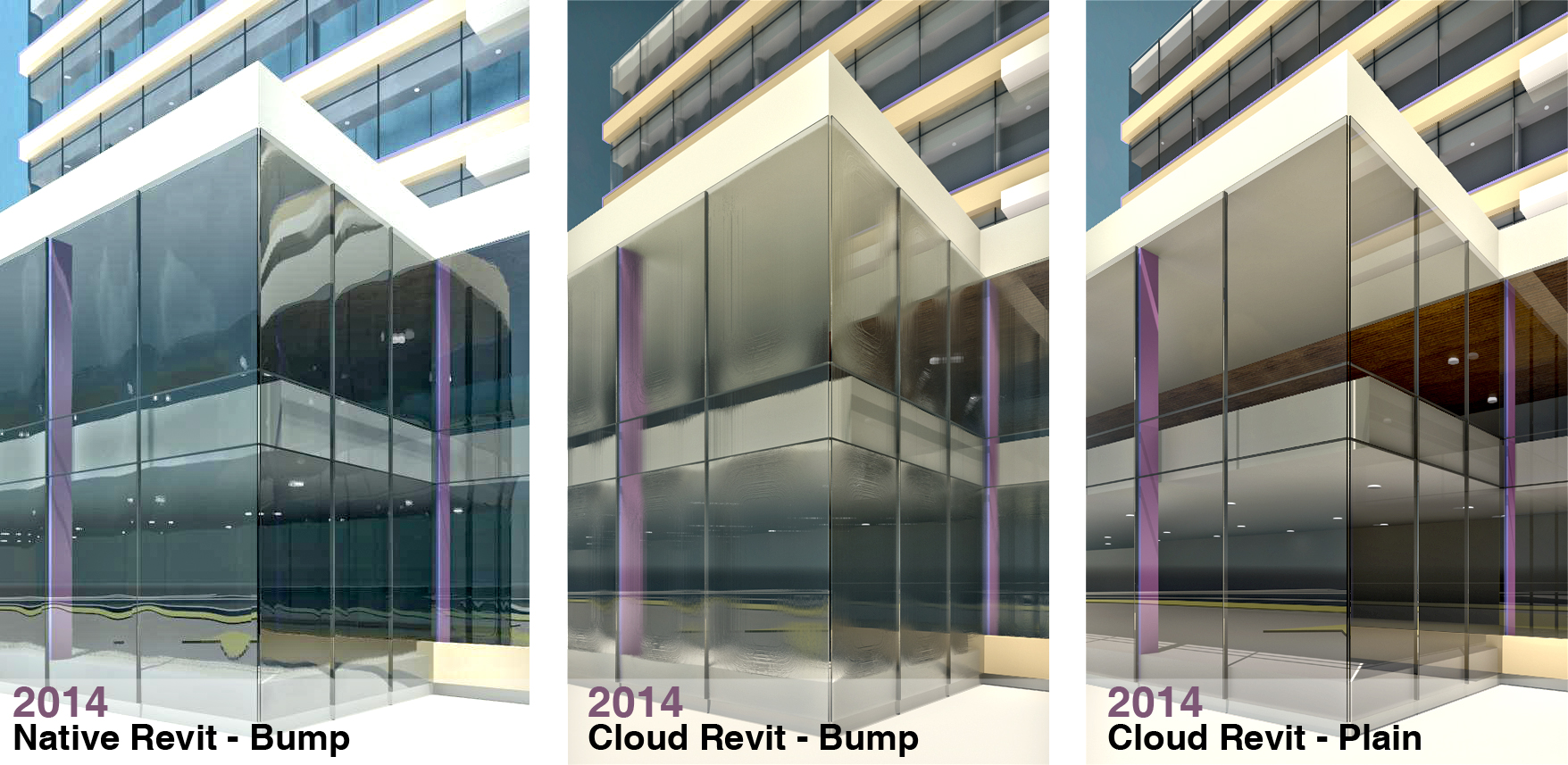
There is something that has always bothered me when I render a building.  Glass.  If you were to get in your car and drive around looking at different buildings you may notice the glass always looks  a little different.  Very rarely will the reflection look perfectly flat (as it does on typical rendering).  Usually, there will be a slight convex reflection due to interior air pressure or other factors.

When I render an image using the default glass material in Revit it is so perfectly flat that it can look non-existent.  I came up with a technique that replicates real-world glass. Check out the image below for some comparisons...

Click to enlarge...
Looks pretty cool, huh?  As you can see from the images Revit's cloud rendering results in a slightly different look.  If you are doing an exterior rendering from further away than the images above Revit's native and cloud renderings look pretty similar.

So, you want to know how to create the same effect?

Tuesday, December 3, 2013

Why Being Proficient is Not Sufficient - Randy Deutsch


Randy Deutsch, the author of BIM and Integrated Design: Strategies for Architectural Practice, published an informative article on his blog. In the article, Randy discusses commonalities seen in emerging architect's resumes and cover letters. If you are looking for a job or have one but like to keep your resume polished I suggest reading it.  Randy has some very interesting ideas about software knowledge and how you should present it to perspective employers...

Click here to read the article "Why Being Proficient is Not Sufficient" on Randy's blog...


Monday, December 2, 2013

Autodesk University 2013 - Live Streaming.


I, unfortunately, will not be attending AU in Las Vegas this year.  To be honest, I had to choose between Autodesk University and Revit Technology Conference... I chose RTC. Fortunately, if you are not attending (like myself) there will be plenty of live-streaming video from the event.   I will be tuning into some of the streams myself.

Click here to view the streaming homepage and sign up now.

Also, there will be plenty of activity via Twitter during the event (most likely using #AU2013).  Some of the "Revit" based guys and girls you will want to follow are: @seandburke, @lynn_allen, @twiceroadsfool, @marcellosgamb, @davewlight, @paulfaubin, @case_inc, and many more...


Wednesday, November 27, 2013

BIM After Dark - Release Date Set


Some of you may have noticed a subtle change to the blogs template.  Well, I updated the template a little bit in anticipation of a big announcement.  After three long months I finally set the official release date for BIM After Dark - Volume 1: Presentation.  The videos will be up for sale on:

Tuesday, December 10th, 2013

So mark you calendars and let the anticipation begin!  If you have not done so already, sign up for the BIM After Dark mailing list.  You will get the inside scoop on all things BIM After Dark (including sales details, pre-released footage, and announcements). 


Monday, November 25, 2013

Article: 11 hot BIM/VDC topics for 2013

A roundup of the hottest building information modeling themes on BDCnetwork.com.

October 30, 2013
Courtesy Gensler

"If you like to geek out on building information modeling and virtual design and construction, you should enjoy this overview of the top BIM/VDC topics. The following collection of feature stories and case studies is based on the number of BDCnetwork.com readers who clicked on the article in the past 10 months. The topics range from BIM for facilities management applications to modular data centers to augmented reality...."


Thursday, November 21, 2013

Major Revizto Update - Coming Soon...


Some of you may remember my post, Revizto for Revit: THE COMPLETE GUIDE, where I provided an in depth analysis and tutorial of Revizto.  Well, the Revizto team appears to be hard at work and are getting ready to launch Revizto 2.0... I am very excited to try out the new version.

The Revizto Blog has been hyping it up quite a bit with some recent posts (here and here).  Here is the latest image they posted for some new "rendering" feature.


I look forward to trying out the new release and sharing it with you guys.  Maybe even comparing it to my previous review....


Monday, November 18, 2013

Renaissance Revit: Creating Classical Architecture with Modern Software


Over the years I have followed Paul Aubin's blog and books.  Throughout those years Paul has been posting about creating classical architecture using Revit (literally, he started talking about this a year ago).  Paul's passion for Revit is indisputable and now his passion for classical architecture is too.  These two passions join forces in a manifesto combining the quality, coherence, and usual gusto put forth in all of Paul's work.  The title, "Renaissance Revit: Creating Classical Architecture with Modern Software", appropriately labels the manifesto.

I was fortunate enough to spend some time with Paul at the Revit Technology Conference this year in Vancouver.  We talked about all kinds of stuff.  Paul seemed particularly excited about finishing "Renaissance Revit" (although the name was not chosen yet).  His excitement is evident in the first sentence of the book, "This is the most exciting book that I have ever written."  And 447 value filled pages later I was left understanding why he was so excited.

Renaissance Revit is much more than just a step-by-step how-to book about creating a Corinthian column. It is an architectural history book, a family creation book, a conceptual massing book, and a parametric design course.  Paul breaks down the classical orders in such a systematic way that you can't imagine building them in any other software.  Revit can't do what? Revit CAN do the classics... And really well...

I can't wait for my next restoration job or typical New England Greek revival building that the project team swears can only be completed in AutoCAD...


Thursday, November 14, 2013

Autodesk Student Community Gets Overhauled


Looks like the Autodesk Student Community received a major renovation.


Having used the Autodesk Student Community for over seven years I have to say it has not always been the most user friendly website.  In fact, it used to be very difficult to find out how to access different areas of the website.  I remember when the Education Community rolled over one million members...  

The latest update makes a student member feel like a paying subscription member.  In fact, this is the first time the student site is directly connected with Autodesk's main site.  This makes sense to me.  If the ultimate goal is to convert a free student license to a paying subscription license, you might as well get them used to the subscription center.  There are some cool show reels and links to all of the great workshops Autodesk offers for free.

Definitely head on over a take a look.  If you are a student and are not taking advantage of all of the FREE software offered to you... What are you waiting for?!

Click here to Access the Autodesk Education Community 


Monday, November 11, 2013

Video: What is BIM?


Pretty cool video explaining BIM to non-BIMMERS...  And yes, I know it was published by ArchiCAD, so what?!

**Warning, fluffy kittens were harmed during the creation of this video**


Friday, November 8, 2013

Revit 2014 Update Release 2 - Documentation


Autodesk finally released the Revit 2014 Update Release 2 with documentation (I previously posted a leaked update download).

Continute reading to find about about what was fixed/updated and download the updates for all flavors...

Wednesday, November 6, 2013

Revit Tutorial - Mapping Patterns and Materials (Enjoy Revit)


This is a very, very, cool tip.  If you have ever had crazy geometry and attempted to wrap it with a material and then render it... You will know that some crazy results can occur.  So how would you make a soldier course pattern and rendering material follow an arch like this:


Thursday, October 31, 2013

Revit 2014 Web Update 2 Direct Downloads


Luke, over at What Revit Wants, discovered some early links via Twitter for Revit 2014's Web Update Release 2!  Download it now!

Onebox - Direct link for RVT version:
http://updatesdl.autodesk.com/updates/files/rvt2014ur20.exe

Keep reading the post for more download links...


SAuBIM Version 2.0 50% Sale Ends Today!


I just wanted to remind you all that your opportunity to purchase SAuBIM v2.0 at 50% off will be ending soon (the sale ends at midnight tonight).  If you haven't taken advantage of this deal yet head on over to the SAuBIM website and buy it now (your purchase will be automatically discounted at purchase).

The SAuBIM team is anxious for our next live Webinar.  You will be the first to know when the webinar will be.  Additionally,  we are ready to answer any and all questions you may have about SAuBIM v2.0.  Just send us and email.

Click here to enter the SAuBIM website to learn more and take advantage of 50% off while you still can!


Tuesday, October 22, 2013

Autodesk FormIt Web Beta


Autodesk released a new beta of "FormIt Web".  Basically, it is FormIt being ran through your browser.

This is pretty awesome... Could this be the next step to getting those squiggly lines into Revit?!

I used it for a little while on Google Chrome here in the office and it ran very smooth.  There are some obvious limitations but huge potential.  Here is a screenshot:


While FormIt Web does not have all of the features of the iOS version (yet) we still could not wait to get it out there and get your feedback. Here are some details:

- Runs in the latest stable builds of Chrome and Firefox on Windows or Mac.
- Modeling operations including: place primitives, extrude polygons, modify faces and edges, boolean operations
- Import satellite images
- Metric or Imperial units
- Apply default materials
- Opens and saves FormIt sketches created on iOS or Android by logging into your Autodesk 360 account.
- We also just released minor updates to the iOS and Android FormIt to support reloading sketches that have been saved from the web (and between the two mobile platforms)
- We want your feedback! Please post your issues, ideas, and questions on our support site.

Click here to learn more...
Click here to launch and use FormIt Web Beta...

P.S. - I know it is only a Beta.... but, PLEASE make it so the middle mouse button pans and "Shift + Middle Mouse" orbits... For God's sake!


Friday, October 18, 2013

BIM After Dark - Official Promo Video Released!


If you are not on the BIM After Dark mailing list yet... what are you waiting for?! Click here to sign up!

Here is a little teaser video we created to get the word out  (make sure you turn your speakers up!):


Thanks to TJ for helping with the video production... Awesome work.

Already signed up for BIM After Dark? Tell others about it too!


Monday, October 14, 2013

Revit Tip - Move View from One Sheet to Another


This is one of those things that will frustrate the heck out of you! Let's say you have a set of views on one sheet and you want to move them to another sheet... What do you normally do?  I know I used to delete the views and then re-drag them onto the new sheet...   That can be a pain!

So what's the easier way?...

Friday, October 11, 2013

The Revit Kid Tutorial Archive: 2009-2010


I was recently checking out the analytics for this blog and saw a few links coming from a site I've never heard of before. I tracked back the link and found an interesting post on a Vietnamese blog.  I would link to the post but I have a feeling it is a spammy/infected site (given the author's profile has links to many "adult content" style blogs)...

The post must have taken a decent amount of time to create because it had links to almost EVERY single Revit tutorial I created (or linked to) in the first year of launching The Revit Kid.com... (2009-2010).  How cool!  I may have to make a similar list for the years between 2010 and now!

I thought it would be helpful and fun to re-post this list...

Wednesday, October 9, 2013

SAuBIM 50% Sale!


First, I want to thank all of you that attended the SAuBIM Live Webinar today.  We had some great questions and interesting ideas!  I hope to do more live events for the blog and BIM After Dark as well!

We are offering SAuBIM at almost 50% off for the entire month of October!

Head on over to the SAuBIM website and check it out... There are a bunch of videos and plenty of information.


P.S. - I forgot to press record on Camtasia and record the webinar!!  I will have to have another webinar and record that one... Sorry for those who missed it!


Tuesday, October 8, 2013

Reminder: FREE SAuBIM Webinar Tomorrow!


This is just a friendly reminder that I will be hosting a FREE webinar about SAuBIM - Code Calculations tomorrow afternoon.  If you have not registered what are you waiting for?!  You get a neat little PDF I made called "How to Search EVERY International Code for FREE!".

FREE SAuBIM v2.0 Live Demo and Q&A!

Live Online Event
With Jeffrey Pinheiro and Harry Mattison
Wednesday, October 9th
4:30PM - 5:00PM EDT (New York)
1:30PM - 2:00PM EDT (California)
6:30PM - 7:00PM BST (London)


CLICK HERE TO REGISTER NOW AND RECEIVE YOUR "How to Search EVERY International Code for FREE!" PDF NOW!!

Sorry, the webinar has ended... Stayed tuned to The Revit Kid.com for future Webinars...


Thursday, October 3, 2013

Revit Tutorial - Show Lights Turned On in Renderings


This is a tutorial that I cannot believe I have not created yet! I have been asked this question so many time and I always search through the blog CERTAIN that I made a tutorial about it. Apparently not...  I guess I always just answered the question without a tutorial.  Well, not anymore!

This tutorial has to do with rendering in Revit and showing lights that ACTUALLY look like they are on.  The default Revit light fixtures produce interior light but do not visually show a light source when rendered.  This leaves renderings feeling less realistic and frustrates the hell out of many Revit users.

This tutorial will show you how to add a visual light source to your renderings.  You will be amazed at how much better the final product will feel and the amount of life it adds!


Wednesday, October 2, 2013

FREE Live Webinar - SAuBIM Code Calculations for Revit


I am excited to announce the first ever LIVE webinar about SAuBIM - Code Calculations for Revit v2.0.  Harry Mattison and I will be demonstrating the power of SAuBIM and how much time it could save you!  We will also be answering any and all of the questions you may have about the product LIVE.

In addition, after registration to the webinar, you will be sent the "How to Search EVERY International Code for FREE!" PDF.

Thursday, September 26, 2013

Revizto for Revit: THE COMPLETE GUIDE


Those of you who have followed this blog will know my never ending interest in the multitudes of presentation techniques and Revit (or BIM in general).  This infatuation is what lead me to BIM After Dark.  This infatuation has also lead me to trying every piece of software I can get my hands on related to utilizing building information models for presentation types of media (from Showcase, to CryEngine, to 3DS Max, etc…).

I stumbled upon Revizto while researching video game engines and Revit.  Then, I had a project in the office that needed a “rendered walkthrough” in less than 24 hours.  I thought to myself, “this will be a perfect time to test out Revizto”.  I downloaded the 30-day free trial and installed the software.  If there is one major point I want you to take away from this review it’s that Revizto is EASY.  The way Revizto communicates with Revit is the way ALL visualization tools should communicate with Revit…. Now that that’s out of the way, let’s get on with the review.

Tuesday, September 24, 2013

Revit Structure Tip - 3D Reinforcement


I think I found this post because Marcello tweeted it... Not fully sure, but it was in my drafts here on the blog.  Anyways, some awesome stuff for Revit Structure... Or, I guess anyone using One Box??

First, a little about the publisher (HÃ¥vard Vasshaug):

"My name is HÃ¥vard Vasshaug and I’m a Digital Design Manager at Dark. I have a passion for the way digital 3D allows my imagination to play, and work out this passion using Revit. I also enjoy distributing knowledge, and often feel I’m in my element when I’m teaching Revit. I work worldwide with anything that relates to this from my base in Oslo, Norway. If you’re interested in learning something about Revit or BIM, please do not hesitate to contact me! "

 And now... Onto the goodies!...

Wednesday, September 18, 2013

Revit Tip - Pin and Unpin Multiple Grids and Mullions


Someone left a comment on an old post about selecting multiple curtain panels and mullions.  I thought it was a simple enough tip that maybe some people have not found simply because they only noticed the "pin" within the working view and not on the ribbon.

When you select a series of curtain grids, panels, or mullions there is an option in the highlighted "Modify | Curtain Wall Grids" tab:

Click to enlarge...

In conclusion, the pin that pops up when you select an element is not the ONLY way to pin or unpin things... 

**Edit** Or as Paul Aubin and Luke Johnson rightfully pointed out... The default keyboard shortcut for Pin is "PN" and Unpin is "UP" ...


Tuesday, September 17, 2013

So You Want to Learn the Revit API??


Some of you may remember Harry Mattison from our launch of SAuBIM v2.0 not too long ago...  Well, Harry has created a course on Udemy (a really awesome site) about the Revit API.  His course contains over five hours of lectures!

Harry is very knowledgeable about the Revit API and was a pleasure to team up with for SAuBIM.  So if you have been wanting to learn how to make your own Revit API add-ins and increase your productivity you should definitely give Harry's class a look.  He also has a 5 star rating so far with some very nice testimonials.


Wednesday, September 11, 2013

Paul Aubin - Classical Architecture and Revit


I met Paul for the first time in Atlanta over two years ago and got to know him even better at this years RTC.  In fact, we had some pretty rough microwaved eggs together at the airport before leaving Vancouver (yuck).

Anyways, Paul is a great guy who produces some quality Revit content.  His next project is a book about created classical architecture in Autodesk Revit.


Paul is looking for some information from the Revit world before finalizing his publication (which he plans on releasing this year!!!  If you are interesting in the subject matter and the book release, please take the time to answer a short survey for Paul.

Click here to  take the survey...


Monday, September 9, 2013

Revit Tutorial - Changing the Font Type of a Section or Elevation Mark (Callout)


This is a really quick and simple tutorial that I think some will find very useful.  Not much explanation is needed because the title says it all.  Here is a video demonstrating how to change the font of your section head in Revit.  The same process could apply to an elevation symbol as well...

Click here to view the changing a section heads font video via YouTube.
Click here to view the changing a section heads font video via Screencast.


Wednesday, September 4, 2013

On Learning New Software.


It has been quite some time since I tried to learn a new software.  Honestly, I forgot what it feels like. Staring at the user interface having absolutely no idea where to begin.  Clicking around and getting frustrated with the results of those clicks.  Feeling scared and thinking "is this really worth it?"  Maybe I should just outsource it.

I have always loved creating things.  Creating music using Cubase, Pro-Tools, or Reason.  Creating artwork in MS Paint and Photoshop.  Creating buildings and renderings in Sketchup, Revit, 3DS Max, etc...  An area I have only slightly touched on is video editing and creation.  I have used iMovie and Windows Movie Maker in the past, but with the quality of work I want for BIM After Dark I decided to dive into the world of Adobe After Effects.  Additionally, I recently finished a rebuild of a car project and am learning TunerStudio to tune the car...

Regardless of the software, the learning process is always the same. There is always that terrifying feeling the first few times I open the software.  The frustration of not being able to find out how to do a simple little task. And finally, the joy of completing my first project.

I was reminded of this over the past few weeks and happily accepted the highs and lows.

Remember, you are not the only one who is or has gone through this process.  We ALL have...


P.S. - I was also reminded about how valuable video tutorials are, why I began this blog all those years ago, and why I will continue to help as many people as I can when they are going through the same things I do when learning new software.


Friday, August 30, 2013

Revit Tutorial - Spanish Roof Tiles (Enjoy Revit)


This is what I love so much about the Revit/BIM community.  This is how I learned Revit and this is how we expand our knowledge and others knowledge too... Taking something like a tip or trick and expanding on it to fit your personal needs or just for fun.  Awesome.

You may remember my raised seam metal roof tutorial from a few weeks ago. Well, HyunWoo Kim, from "Enjoy Revit" used the same concept to create Spanish  Roof Tiles.  The results were pretty awesome.

Oh, and there is a family file to download...

Wednesday, August 28, 2013

Revit Tip - Interior Rendering Shows Black (Lights Won't Turn On)


Over the last four years of writing on this blog I cannot tell you how many times I have gotten an email about this.  I have no idea why it took me so long to publish it in a post...

Generically speaking, the email goes like this:

"I have an interior rendering with lights and when I render the view the room is black"

To which I reply:

"Are the lights on? Is the render set to use artificial lights?  What light family are you using?" etc...

By the second or third email I will usually have them send me the Revit file, knowing full well what the problem is going to be.  Your camera is in the wall!  Say what?? ...

Thursday, August 22, 2013

SAuBIM - Code Calcs v2.0 Discount Extended!


I woke up this morning with quite a few emails from readers who were upset the discount code "BOOSTBIMKID" had expired for SAuBIM - Code Calcs Version 2.0.  Because of this, we have decided to extend the discount code until Monday, August 26th.

Make sure you take advantage of the savings now and start cutting your hours down filling in those silly little occupant load tags!

Click here to learn more about SAuBIM and to download it now.

Also, if you are interested, here's a list of some of my fellow bloggers talking about SAuBIM:

Version 2.0
Luke at What Revit Wants
Tim at Revit Addons

Version 1.0
Steve at RevitOpEd
Greg at Revit3D
Luke at What Revit Wants


Wednesday, August 21, 2013

SAuBIM - Code Calculations for Revit Version 2.0 - Available Now!


Finally, after two years, SAuBIM - Code Calcs for Revit Version 2.0 is available for download!


I took a quick detour away from BIM After Dark after reaching out to Harry from Boost Your BIM for some help updating SAuBIM.  Harry was excited to help make SAuBIM an add-in within Revit 2013 and Revit 2014.  He was awesome to work with and I think we created an extremely useful tool.

The first version of SAuBIM was released in May of 2011 and looked to connect a calculated parameter with a room tag in order to create Code Compliance and Egress plans quickly.  Unfortunately, the API for Revit 2012 did not allow a few things to happen so the program had to open and close Revit a few times during the process.  Not any more!!

SAuBIM Version 2.0 is a fully integrated add-in that will semi-automatically update your occupant load tags with the click of a button.  Check out the video below:


(Use offer code "BOOSTBIMKID" for an extra 15% off today only!)


Tuesday, August 20, 2013

What If? and Getting Out of Tomorrow's Way


We get a bunch of different magazines in the office throughout the month.  Architecture Boston is not normally one that I pick up and read but this months issue had a really cool cover.  So I took a look.  There was a series of essays titled "What If?".  The premise of the collection is to envision what the future of architecture and design will be...

Feel free to read all of the essays but one really struck a chord with me.  The last essay, "Getting out of tomorrow's way", illustrated a refreshing perspective.  The author, Chris Luebkeman, analyzes the "20-year-olds" of Arup and compares them to his generation within the firm.  Chris then throws in this little gem:

"Pearl S. Buck said, “The young don’t know enough to be prudent and therefore they attempt the impossible — and achieve it, generation after generation.” We need to get out of their way so that our next generation can indeed do the impossible..."

I found this to be so interesting and thought provoking.  I started to think about who or what could be in my way...

Who or what is in your way?  Requirements of authorities having jurisdiction?  Senior members of the firm who will not evolve their process?  Teacher's that don't embrace technology?

(In perfect timing, Uncle Phil spoke about the future of BIM at a recent NYC RUG meeting.  Check it out!)


Monday, August 19, 2013

Revit Pattern Files - Update with Pattern File


I updated the link for the Revit Pattern files post to a download link with the two source files zipped.  Additionally, I have added a link within the post down download the actual .pat file....


Friday, August 16, 2013

Revit Pattern (.pat) Source File


You may remember a handout a colleague of mine, Doug, created explaining view depths.  Well, he created another super informative handout about Revit pattern (.pat) files.  Additionally, he created a Revit source file that contains a bunch of pattern files!  Doug was nice enough to let me share it with all of you.


Enjoy...

Monday, August 12, 2013

"BIM After Dark" - Coming soon...


BIM After Dark Logo

CLICK HERE - BIM After Dark is LIVE NOW!


Ironically, my last post about adding depth to your elevations leads into this post perfectly...  For some time now I have been wanting to put together a comprehensive series of videos that inhabits all of the value this site has had to offer over the past four years.  For those of you who took the Revit Kid Reader's survey I posted last month you may have an idea about what is coming next.

BIM After Dark CoverI would like to formally introduce you all to "BIM After Dark".  BIM After Dark (or "BAD" for easier typing) is a video series (and more) I will be producing that combines the simplicity of my video tutorials with a structured curriculum on a set topic.  Every video will be brand new and the topics will be extremely focused.

Derived from the late nights I spent perfecting the techniques illustrated in the tutorials, "BIM After Dark" is a new brand and adventure I am extremely excited for.  You may be thinking, "Why not use The Revit Kid branding for the series?"  There are two main reasons: 1) The series will utilize an array of software, not just Revit. 2) Directly selling anything on a registered trademarked domain ("Revit") can only lead to problems down the road (especially with Big Brother watching so closely these days).


The name also allows for expansion of the brand down the road.  Many of you visit this site after office hours and look to expand your knowledge with the tools of our trade. Perhaps, in the future, BAD can become a live webinar or in-person experience after office hours (hence, "After Dark").

The first video of the series will focus primarily on my presentation techniques.  I want to prove to the world that "BIM can be sexy..."  Over the years I have shared many different presentations and graphics I have produced (education and professional) but I have only made a few videos and tutorials about how they were created.  From hand sketches, to Revit, to 3DS Max, and Photoshop, I will use real-world examples and show you all of my presentation techniques (some examples of the variety of what I have done over the last few years can be seen on my personal website here).  Additionally, for the first time ever, I will be packaging tons of sample files, example files, and projects with the episodes.

Here is a Promotional Video I had created to lay it all out....


If you are interested in following my progress, release dates, and bonus information, please sign up for the BIM After Dark newsletter.

Lastly, I want to thank every one of my readers for following the blog.  Whether you are just discovering the blog or have been following me for years you are the reason I keep it going.  The launch of BAD will not stop me from posting free videos and information here on The Revit Kid.com.  I love you all and will continue my dedication to this website and the community abroad.

As always, feel free to contact me or comment below.

With my utmost gratitude,


- Jeffrey A. Pinheiro AKA "The Revit Kid"


Tuesday, August 6, 2013

Revit Tutorial - Adding Depth to Your Elevations


A buddy of mine called me up asking about an old tutorial that he stumbled upon here on the site.  The tutorial, unfortunately, had some bad links in it.  I linked to a blogger who no longer blogs.  I wish I could remember exactly what the post was about but I thought it was a good topic to make a video on.

There are many different ways to create "depth" in your elevations and sections.  Unfortunately, none of them are done automatically (unless you are using shadows or ambient shadows).  One day, in my wildest dreams, Revit will automatically create outlines and view depth in elevations based on clipping distances...

Until then, here are some of my everyday tips for elevation and section view depths...

Friday, August 2, 2013

Revit Tip - Find Out What Materials Something Has Been "Painted"


This is one of those things that can frustrate the heck out of someone but is so simple it will immediately make you face palm.  I thought it was worth a quick post....

All you have to do is select the paint tool (PT) and hover over the face you want to know about... This is what will pop up:

If you read the pop-up it says "Face:Painted with Brick Common"...  Tah dah!

One last tip.. If you want to remove paint there is a little arrow next to the Paint button.  When pulled down there is a new tool called "Remove Paint":


Thursday, August 1, 2013

Revit Tutorial - Having Two Unique Revision Schedules That WORK!


Sean, a friend of mine, reader of the blog, and currently works at Streetsense (a pretty cool company you should all check out), sent me a real bugger of a question.

"On our title block we have in our office has two different sections for drawings when we send them out. We have an issues category and a revisions category and the way we have to input information currently is a pain in the ass, creating a frenzy of copy and paste for the title and date for each sheet in individual labels.

I was wondering if there is another way to separate the revit revisions schedule to have revision sets in one column and issues sets in another. When we add the additional revisions “schedule graphic” to the sheet there is not an option under “schedule: Revisions” for filtering out certain revisions. Like in a schedule there is the option to filter out certain tags, numbers, floors, etc. there is not one in the revision properties."

Essentially, Sean needs to have two schedules on his sheets... a "Revisions Schedule" and an "Issues Schedule".  These schedules need to show completely different information yet be controlled by revision clouds.  They also can't show a Revision on the Issues and Issues on the Revision.... Well then..

At first thought you may think... "Just add a few parameters in the titleblock family and call it a day".  Sorry... You cannot add parameters to the "Revision Schedule".  They are hard coded into the software.

But... you CAN add a Calculated Value... Dun, Dun, Dun!

Tuesday, July 30, 2013

The New Revit Kid Facebook Fan Page


The Revit Kid.com has had a Facebook page for years now but it is about time to upgrade.  The page was created before "fan pages" and lacked many of the new features Fan Pages give you.  The page also got very spammy and it was hard for me to moderate because it was so old.  Well, I finally started a "fan page" for everyone to "like".  I hop you guys will post questions, comments, concerns, or just say hi and "Like" me on Facebook!


Monday, July 29, 2013

Revit Tutorial - How To Add and Format a Revision Schedule


Hunter, a follower of the blog, emailed me a question:

"Is there a way to change the text size for a Revit revision schedule?"

Yes, there is a way to change the text size and formatting of a sheet revision schedule in Revit.

Friday, July 26, 2013

Revit Tutorial - Standing Seam Metal Roof


This is a cool little tip that some of you may find useful.  Basically, the idea stemmed from wanting a quick way to represent standing seam metal roof ridges in three dimensions.  By default, the Revit material for standing seam metal roof has a surface pattern and an image with a bump map.  Most of the time this is a sufficient representation of a standing metal seam roof: the data is there, the graphic representation is there, and your construction documents will look fine!

So, why bother modeling the seams in 3D?  Well, for rendering!  The default material for standing seam roofs does not look good at all rendered... Not one bit. I am going to show you a very fast way to create standing seams ribs with the roof you ALREADY CREATED!

Thursday, July 25, 2013

Revit Technology Conference - Europe 2013


Many of you may have seen my posts about the Revit Technology Conference event I have attended in North America over the past two years. Just by reading those posts you can get a feeling of how beneficial I think the conference is.  For those of you in Europe who may find North America or Australia too far away I completely understand...  Well, this year RTC is coming to you! There is still plenty of time to register.


Wednesday, July 24, 2013

Revit Tip - How to Hide a Revision Cloud


Funny little detail when using Revision clouds. If you want to hide the revision clouds on a sheet and also hide the revision information from the revision schedule on that same sheet how would you hide it?  Well, common sense would tell you to simply hide the revision cloud and tag categories (especially if you have multiple clouds).  Unfortunately, your revision schedule will continue to show the revision information!

So, how do you hide the revision cloud, tag, AND information from your sheet?

Tuesday, July 23, 2013

The Super Secret Stacked Wall Methods ... Kind of?


How do YOU construct a wall that changes materials vertically and/or horizontally?

There will almost always be a few answers to this question.  Why is it a secret?  Because it is one of thos subjects that people just DO and don't really think about how or why they are doing what they are doing! I am just as guilty as the next guy.  It wasn't until a buddy of mine asked me the very same question did I sit down and ponder it. 


My honest answer... It depends!  Let me break it down and explain the methods...

Sunday, July 21, 2013

Revit 2014 Update 1 - Structure, MEP, and Architecture Downloads


Well, the 2014 platform updates quietly rolled out last week.  For those of you who decided not to take the plunge into 2014 "because you were waiting for service pack 1"... Well, you have no excuse now!  Notice they claim to have fixed the cloud bugs...

Here are some important links for all the flavors of Revit...

Thursday, July 18, 2013

Revit Tutorial - Massing and Adaptive Components (Marcello at PDX Rug)

Marcello stopped by pdxRUG on his way home from RTC and gave a lecture about massing and adaptive components.  The screen is a bit hard to see but if you are interested in the world of massing and adaptive components check it out:


Tuesday, July 16, 2013

Revit 2014 Cloud Issue - "A Problem Occurred. File Could Not be Translated. -1"

Apparently there is a known issue with Revit 2014 and Autodesk Cloud Rendering.  The issue will through a dialogue box that states: "A Problem Occurred. File Could Not be Translated. -1"


Why does this happen?

The Revit Kid Reader's Survey Final Week

Now that I am back from RTC and the getting back into "work mode" I wanted to remind everyone that the Revit Kid Reader's Survey is still active and will end this week.  I have received lots of responses and some excellent feedback.  Thank you to all of those who responded so far.

If you have not responded yet head over the the reader survey page and get your free gift after responding!

Thanks!

- Jeff


Saturday, July 13, 2013

Revit Technology Conference North America 2013 - Day 3 Recap

Today is the third and final conference day. My day started with a class led by Lillian Smith and Matt Jezyk. I wasn't sure what to think of the class before going because the description made it sound like it was just going to cover some conceptual energy modeling stuff. Well, in short, it did. But on a whole different level.

Matt and Lillian are some of the original team that helped develop Revit (before Autodesk acquired it) and now their jobs inside of Autodesk are to test, tune, and push all kinds of cool new things to the limits. With the assistance of dynamo, Lillian illustrated some examples of iterating through conceptual masses rotations and parameters to find optimal sizes, shapes, and footprint based on the suns location. Very cool.

Revit Technology Conference North America 2013 - Day 2 Recap

Today's classes felt like they had even more substance then yesterday's. The morning kicked off with Marcello's class about scaling methods. For those of you who do not know who Marcello is then check his blog out here. He is known for pushing Revit to it's limits... Or better yet, illustrating that Revit does not have limits.

Marcello broke down different methods of scaling any family. That's right, scaling a family. Honestly, they weren't even difficult methods... Just ones that no one has ever thought of! Total face in palm moments. I can't wait to get in from of my computer and explore Marcello's methods even deeper. And, of course, share my explorations with you all.

Friday, July 12, 2013

Revit Technology Conference North America 2013 - Day 1 Recap


Yesterday marked the first full day of RTCNA 2013. The day began with a keynote address by Lee Crockett. Lee was a fantastic speaker and really hit home with some of the subjects he spoke about. Mainly, when it came to technology and the future. One of my favorite quotes from his keynote was "when the rate of change outside of an organization is greater than the inside, the end is near". He then gave some solid examples such as Kodak and Borders. Think about your office or firm... I know I thought about mine. Are we changing at a rate parallel to the technology around us?